


About the organisation
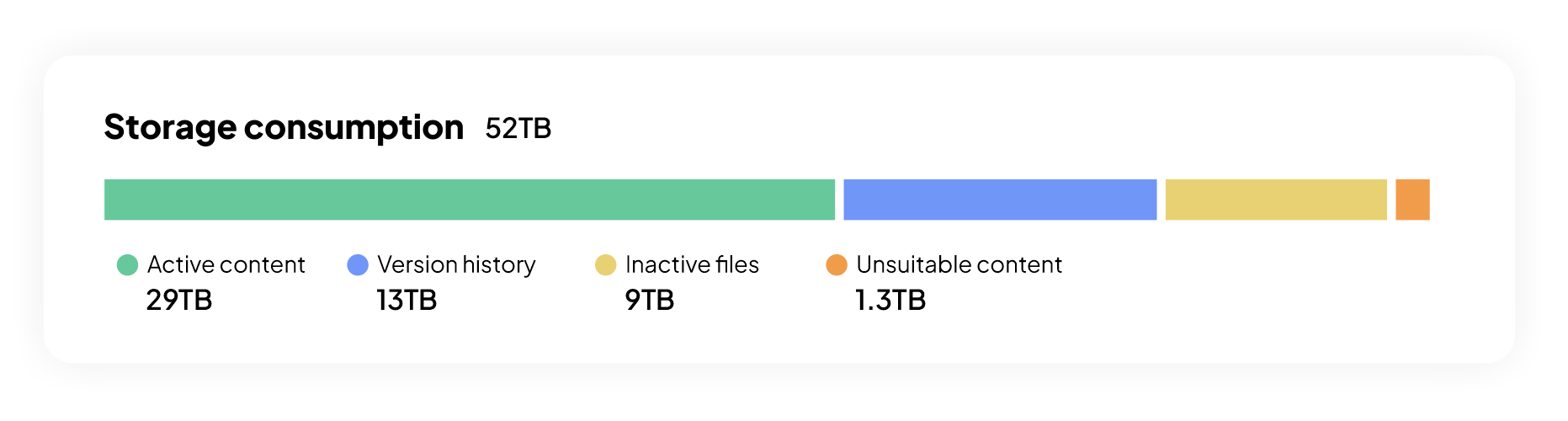
At 52TB of storage consumption, this enterprise had moved well beyond the point where manual oversight could explain what was happening.
At smaller scale, storage inefficiencies are tolerable. At larger scale, they become expensive very quickly.
The challenge
The organisation didn’t lack awareness - it lacked prioritisation.
Most SharePoint administrators in large tenants recognise the usual causes of storage growth:
- Version history expanding quietly
- Inactive content accumulating
- Teams usage driving new storage automatically
- Deleted files still occupying space in recycle bins
- Users uploading files which do not belong in SharePoint
The challenge wasn’t identifying these issues. It was determining where exactly they were occurring, so that they could be addressed in bulk with full visibility and activity history. The IT management team had been searching for a solution to cleanup for several months, specifically a solution which would provide a positive ROI.
“We knew there was waste everywhere. We just needed to find the parts that mattered most.”
Why SProbot
At scale, the biggest risk is not inaction - it is misdirected effort.
Without clear data, the IT team spent time investigating smaller issues while the largest storage drivers continued unchecked. A tenant of this size needed a way to isolate:
- High-impact version-heavy files
- Large volumes of inactive data
- Content sitting in the wrong storage tier
With SProbot, that level of visibility made prioritisation possible.
What the IT team discovered
The single biggest opportunity was version history, where 13TB was trimmed, producing $31,950 in annual savings.
This aligns with typical behaviour in collaborative environments, where repeated edits and AutoSave can generate hundreds of versions over time - particularly for large files.
Content not suitable for SharePoint
At enterprise scale, inappropriate data placement becomes a meaningful cost factor.
Large media files, exports from internal systems, and bulky datasets had accumulated in SharePoint despite offering little collaborative value. This category alone accounted for 1.3TB, saving $3,195 annually once addressed.
This reflects a broader platform reality: SharePoint supports large files, but performance and cost effectiveness can degrade when it is used as a general-purpose storage layer for everything.
These files were moved to on-prem storage locations already available.
Inactive content and cost discipline
The largest structural opportunity sat in inactive content. Rather than treating all old data the same, the organisation split its approach:
- Archive where value remained
- Delete where it did not
When investigating using SProbot's large and inactive file reporting tools, these cleanup actions were completed:
- 7.2TB archived → $13,270 savings
- 1.8TB deleted → $4,420 savings
This approach avoided the common trap of over-retention, where organisations keep everything in premium storage “just in case.”
Results
Total annual savings: $52 835
In summary
At this scale, storage optimisation is less about isolated fixes and more about getting the hierarchy of problems right.
Version trimming delivered the largest impact, but real control came from combining that with better decisions around inactive content and data placement. The result was not just cost reduction, but a more intentional use of SharePoint itself.