


If you’ve ever asked “What reports can I run in SharePoint?”—you’re not alone. SharePoint offers a variety of built-in reports, but many admins and site owners aren’t sure where to find them or how to use them effectively. In this post, we’ll break down the most common types of reports in SharePoint Online, how to access them, and how tools like SProbot can take your reporting to the next level.
What Does “Report in SharePoint” Mean?
A “report in SharePoint” can refer to:
- Usage reports: Who’s visiting your site and what they’re viewing
- Audit reports: Who accessed, edited, or deleted content
- Sharing reports: What content is shared externally
- Permission reports: Who has access to what
- Storage reports: How much space is being used
- Content reports: What files exist and whether they’re active
Each report type serves a different purpose—from security and compliance to performance and planning.
1. Site Usage Reports
Every SharePoint Online site includes a Site Usage page:
- Page views
- Unique visitors
- Popular content
- External sharing activity
Access it via Settings → Site Usage
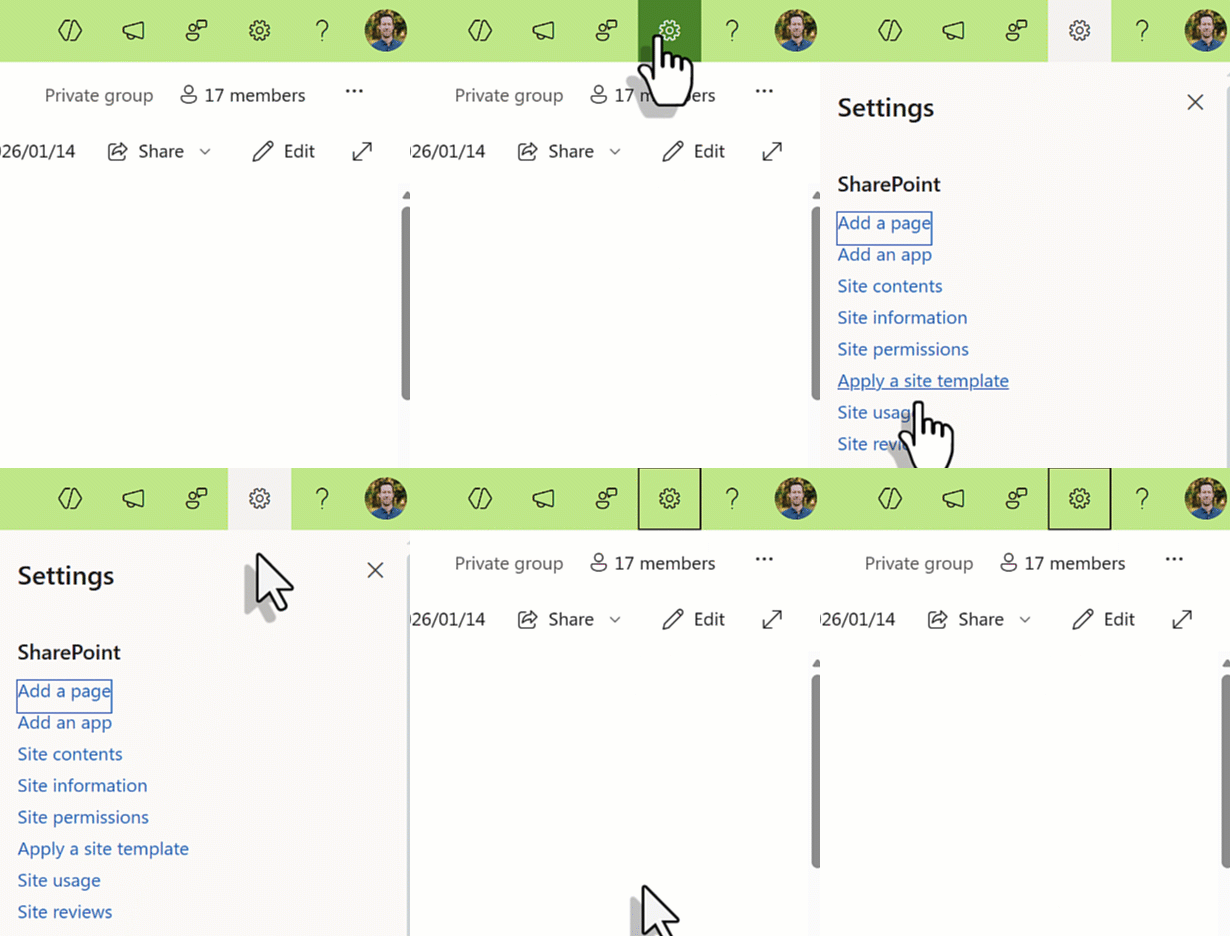
Site Usage reports are useful for site owners who need to track engagement. It includes an overview of:
- Page view traffic
- Popular documents (by unique viewers or views)
- Usage insights which includes device and time distribution
- Sharing report which lists documents which are shared with external users and enables generation of a more detailed sharing report
page view traffic,
2. SharePoint Activity Reports (Admin Center)
Admins can access tenant-wide reports in the Microsoft 365 Admin Center:
- File interactions (viewed, edited, shared)
- Active users
- Storage trends
These reports cover SharePoint, OneDrive, and other services.
3. Audit Reports (Compliance Center)
For deeper insights:
- Go to the Microsoft Purview Compliance Portal
- Use the Audit tool to search for:
- Downloaded files
- Deleted items
- Permission changes
Ideal for security and compliance reviews.
4. Sharing Reports
Want to know what’s shared externally?
- Use the Site Usage page to export a report of externally shared files.
- Or use the Audit log to track sharing events.
Note: External user details may be limited in native reports.
5. Storage Reports
Track how much space your sites are using:
- Admin Center → Reports → Storage
- Shows usage over time and per site
Useful for capacity planning and cost forecasting.
6. Content Reports
SharePoint doesn’t offer a built-in content inventory report. To get a full list of files, lists, and libraries, you’ll need:
- PowerShell scripts
- Graph API
- Third-party tools
This is where SProbot shines.
Go Beyond Native Reports with SProbot
SProbot offers automated reports that go deeper than Microsoft’s built-in tools:
Inactive content reports: Identify stale files across your tenant👉 https://www.sprobot.io/blog/inactive-content-report
Storage usage reports: Track growth and forecast future needs👉 https://www.sprobot.io/blog/how-to-generate-a-sharepoint-storage-usage-report
Health Check dashboards: Get a governance overview of your environment👉 https://www.sprobot.io/blog/health-check-and-recommended-reviews
These reports are easy to schedule, export, and share—no scripting required.
Final Thoughts
SharePoint offers a range of reports, but they’re often scattered across different portals and limited in scope. By combining native tools with SProbot’s advanced reporting features, you can build a complete picture of your SharePoint environment—supporting better decisions, stronger governance, and improved performance.