


TLDR
Restricted SharePoint Search is going away, and if you rely on it today, you must act before January 2027.
- Microsoft will not migrate your settings automatically
- Your previously restricted content may become discoverable
- The replacement, Restricted Content Discovery (RCD), follows an inverted approach with explicitly restricting groups and sites
- SProbot helps you discover risky content and apply RCD contextually and in bulk
Organisations that move early will avoid Copilot oversharing risks and regain control over content visibility.
Why Restricted SharePoint Search is being retired
Restricted SharePoint Search (RSS) has always been a temporary control. It allowed organisations to limit which SharePoint sites appeared in Microsoft Search and Copilot while permissions were being reviewed. However, it was never designed as a scalable or long-term governance model.
Microsoft has now formally announced its retirement:
- New enablement stops on 31 July 2026
- Full retirement happens on 31 January 2027
- PowerShell support ends in February 2027
Critically, Microsoft has also confirmed that:
- RSS configurations will not be migrated
- Organisations must manually transition to new controls
- If no action is taken, previously hidden content can become discoverable
This is not just a feature change. It is a governance risk event, especially for tenants in the process of adopting Microsoft 365 Copilot.
What replaces RSS: Understanding Restricted Content Discovery
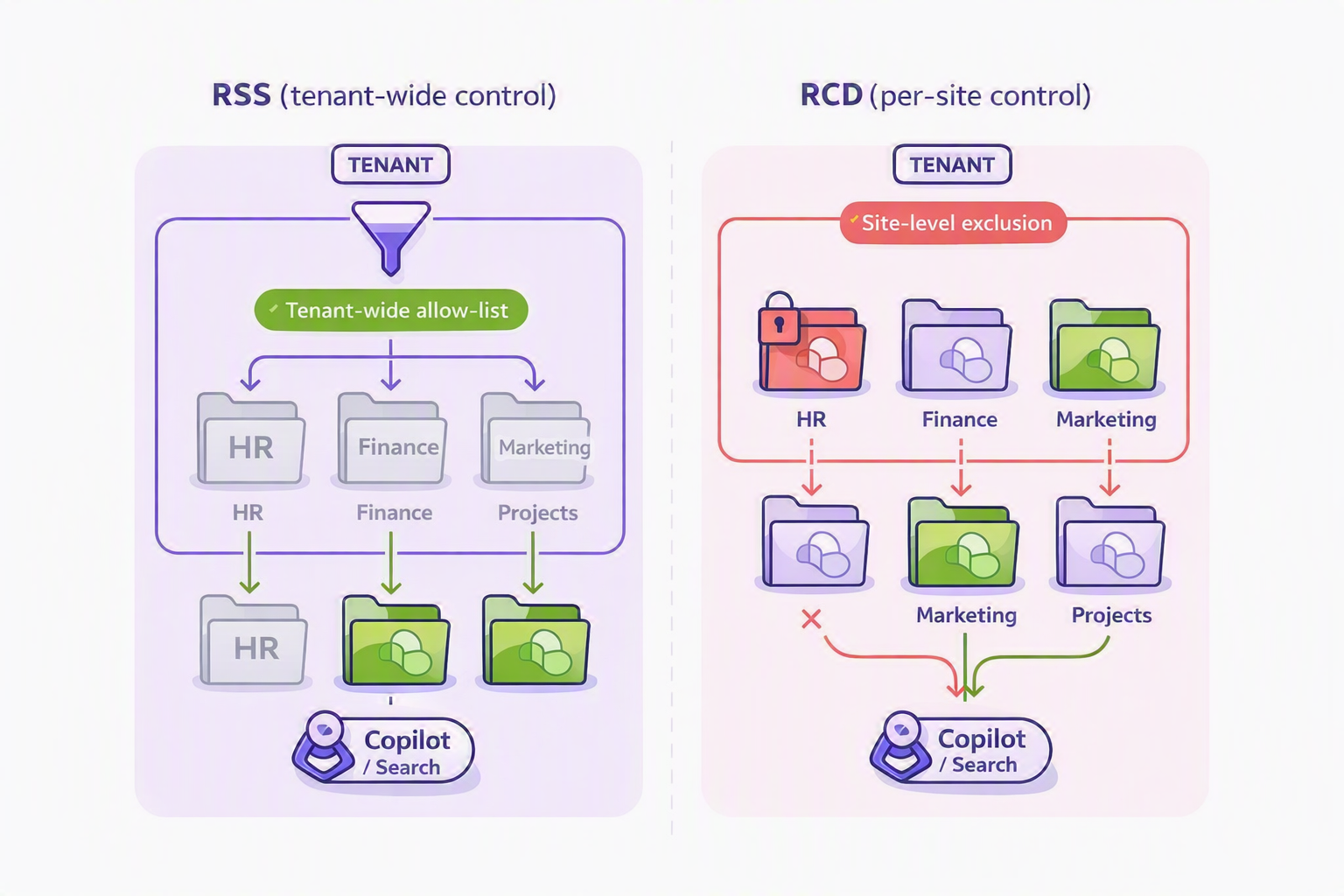
Restricted Content Discovery (RCD) is the modern replacement for RSS, but it behaves very differently. Instead of a single list of allowed sites, it introduces granular, per-site discoverability control.
RCD allows administrators to prevent content from specific SharePoint sites from appearing in organisation-wide search and Copilot experiences, while still allowing direct access for users who already have permissions.
RCD is not a security boundary. It controls discovery, not access.
Key characteristics of RCD
- Managed at site level, not a single list at tenant level
- Stops content appearing in Microsoft Search and Copilot
- Does not change permissions
- Designed as a governance control
- Intended to support Copilot rollout safely
The simplest way to summarise the difference is:
👁 RSS = Allow, managed in a single list
⛔ RCD = Block, managed with an individual toggle per site
How do I apply RCD?
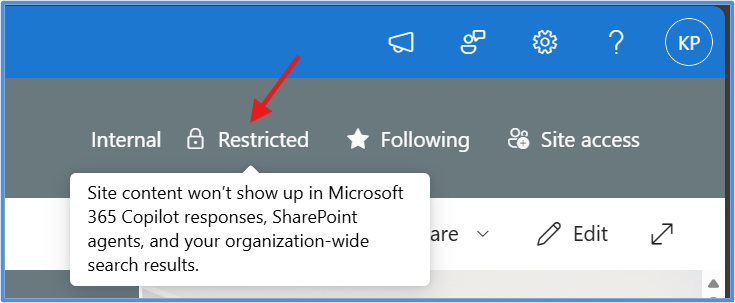
RCD can be applied per site via the SharePoint admin center, PowerShell, or delegated to site owners.
When a site has RCD applied, it shows as Restricted in the status bar.
Why manual transition to RCD is difficult
At a conceptual level, moving from RSS to RCD is simple. You are simply inverting the control model from an allow list to a selective restriction model. In practice however, it introduces a very different operational challenge. Instead of curating a limited set of approved sites, you now need to identify and manage risk across potentially thousands of sites that are visible by default.
The difficulty is not the control itself. It is the scale at which it must be applied and the lack of built-in prioritisation.
RCD is applied at site level, and each site must be evaluated based on its content, permissions, and risk profile before a decision is made. This creates a dependency on discovery and classification that RSS largely avoided. Where RSS allowed you to focus on a small set of trusted sites, RCD requires you to understand the entire estate before deciding what to exclude.
This quickly becomes unmanageable in real-world environments, because a typical tenant may contain hundreds or thousands of SharePoint sites, many of which:
- Have unclear ownership
- Contain a mix of sensitive and non-sensitive content
- Have evolved organically over time without consistent governance
- Include legacy permissions, guest users, or historical sharing decisions
At this scale, even Microsoft recognises that managing RCD can become a “time soak” for administrators due to the number of individual sites that must be controlled.
The problem is compounded by the fact that RCD is also not intended by Micnot a permanent solution. It is designed as a temporary control to give organisations time to review permissions and governance before making content fully discoverable. This means you are not just applying it once. You are expected to revisit, reassess, and eventually remove it as part of an ongoing governance process.
There are also practical considerations that make manual execution harder:
- Each site requires an individual decision, not a bulk default
- Overuse can reduce search quality and Copilot effectiveness, so it must be applied selectively
- Applying it broadly without context can hide useful content and degrade user experience
In reality, the challenge is not toggling RCD. The challenge is knowing where to apply it and doing so consistently across a complex, evolving tenant.
The missing step: knowing what’s in your tenant
You cannot protect what you cannot see. Before applying RCD, you need a clear understanding of:
- Which sites contain sensitive or regulated content
- Where oversharing risks exist
- Which sites have not been reviewed or governed
- Which sites are safe to expose to Copilot and search
Traditional approaches rely on manual audits, PowerShell scripts, or partial reporting. These methods are slow, inconsistent, and often incomplete.
How SProbot AI content assessment accelerates your RCD readiness
SProbot’s AI-powered content assessment gives you immediate visibility into your SharePoint environment, without complex scripting or manual analysis.
Instead of guessing which sites are risky, you can:
- Automatically assess your tenant content
- Identify potentially sensitive data patterns
- Prioritise high-risk sites for review
- Understand content exposure before enabling Copilot
This transforms RCD from a reactive control into a proactive governance strategy.
What SProbot helps you uncover
After running an assessment, you can quickly identify:
- Sites which contain sensitive content such as financial, HR, and executive records
- Sites with broad sharing or access anomalies
- Legacy sites that were never fully governed
- High-volume content repositories with unknown classification
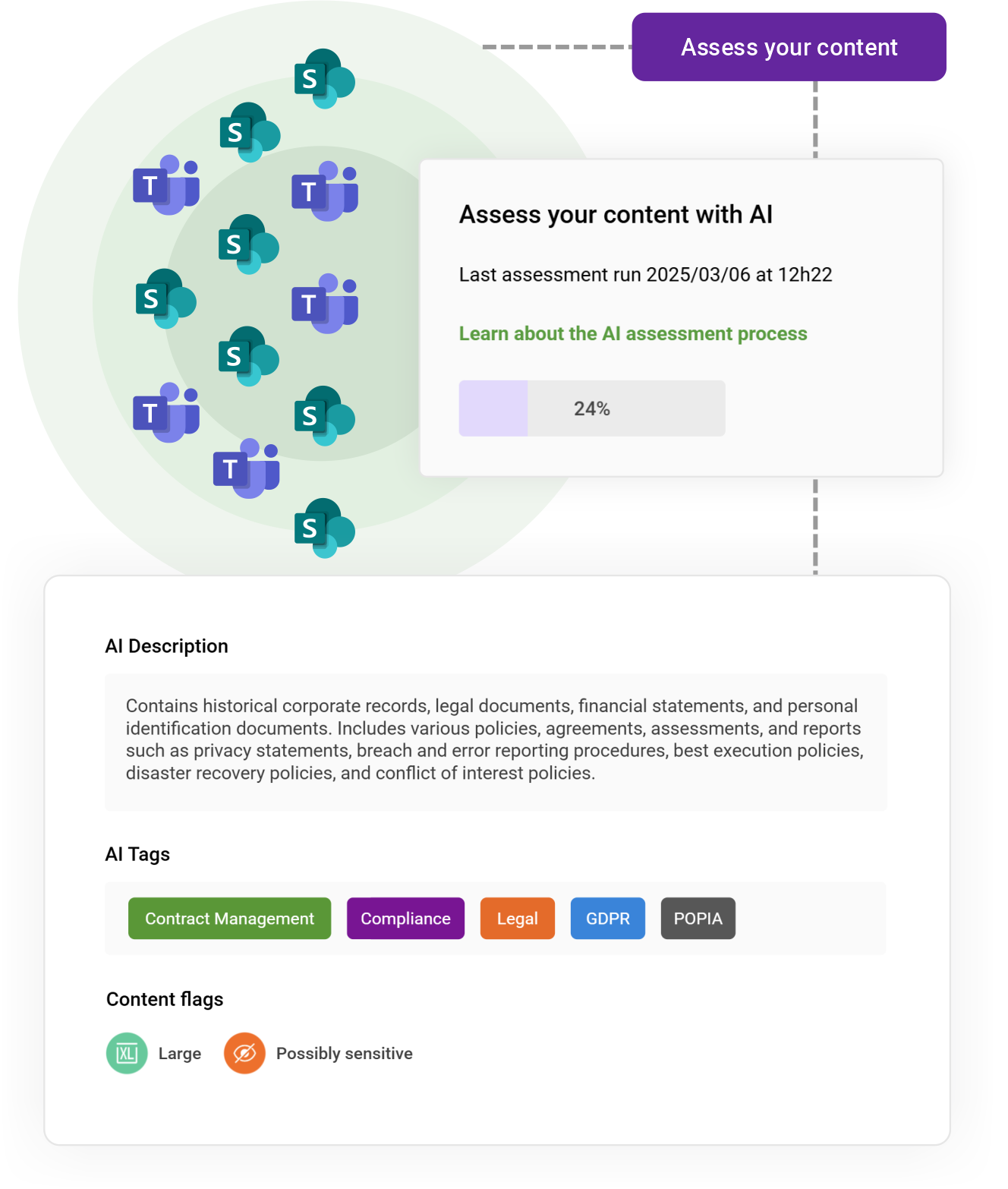
This becomes your source of truth for deciding where RCD is actually needed.
From insight to action: applying RCD at scale with SProbot
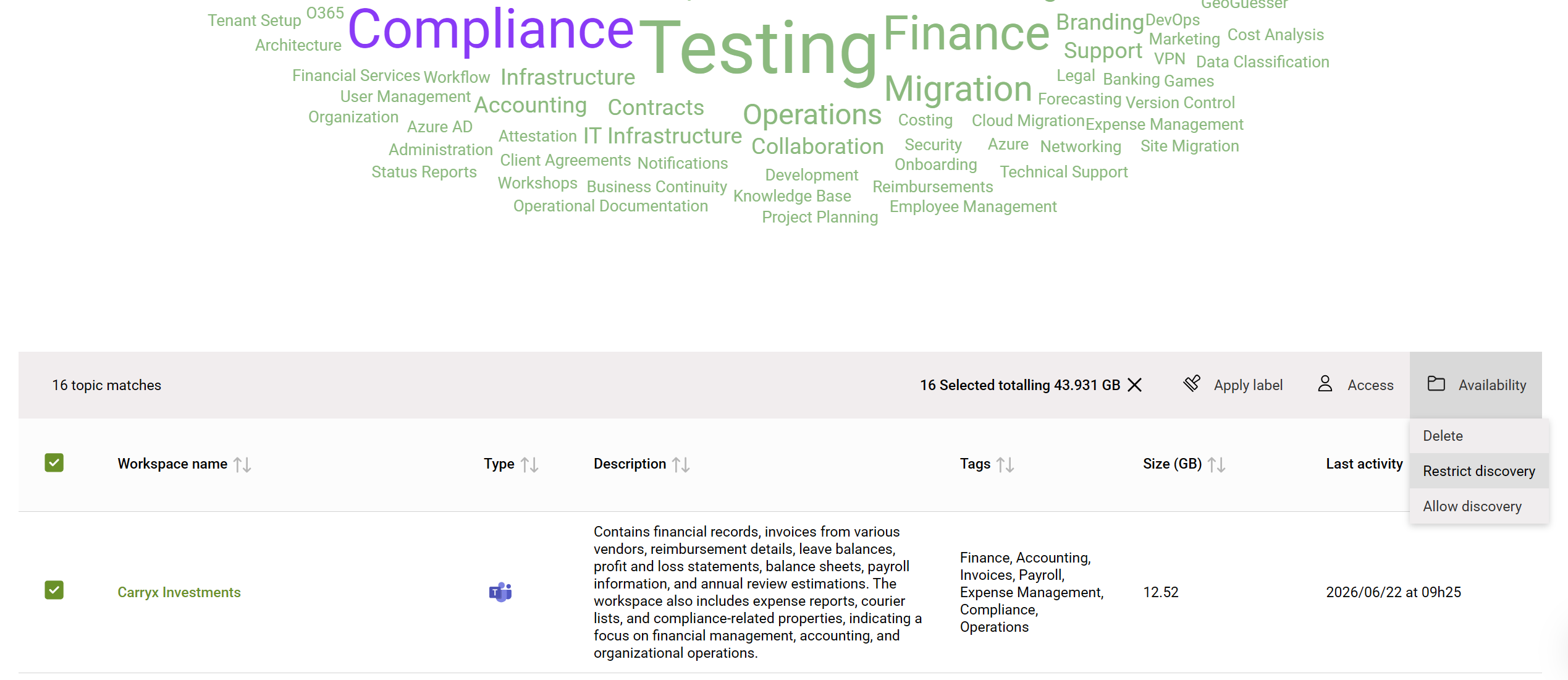
Once you know which sites need protection, the next challenge is execution. RCD is applied per site, which makes bulk operations difficult using native tools alone.
SProbot bridges this gap by enabling:
- Bulk selection of high-risk sites
- Automated policy-driven decision making
- Scalable execution of governance actions
- Faster rollout of RCD across your tenant
This is critical, as RCD is designed to be used selectively across sites which aren't AI-ready yet (or contain content which should never be surfaced by AI) and what isn't AI-ready differs vastly between tenants. Context of what sites actually contain is what's important, not just simply what owners say they contain.
Best practice migration approach
Moving from RSS to RCD should not be treated as a simple replacement exercise. It requires a structured approach that aligns with modern governance and Copilot readiness. A strong migration plan should include:
- Discovery and classification of SharePoint sites
- Identification of high-risk or unreviewed content
- Targeted application of RCD
- Ongoing governance and review process
Importantly, RCD should be used as a temporary control, giving your organisation time to fix underlying permission issues before making content broadly discoverable again.
Conclusion
The retirement of Restricted SharePoint Search is a forcing function for better governance.
The old allow list is disappearing, and what replaces it requires precision, visibility, and scalability. Organisations that fail to act risk exposing sensitive content to search and Copilot experiences.
SProbot gives you everything you need to respond:
- Visibility into your SharePoint content
- AI-driven identification of risk
- Scalable application of Restricted Content Discovery
The question is no longer whether you need to transition. It is whether you are ready.
FAQ
What is Restricted SharePoint Search and why is it being retired?
Restricted SharePoint Search is a tenant-level feature that limited which sites appeared in search and Copilot. It is being retired because it is not scalable and is being replaced by more granular controls like RCD.
When does Restricted SharePoint Search stop working?
New enablement stops on 31 July 2026, and the feature fully retires on 31 January 2027, with no automatic migration to RCD.
What is Restricted Content Discovery (RCD)?
RCD is a per-site control that prevents content from appearing in organisation-wide search and Microsoft 365 Copilot while maintaining existing permissions.
Does RCD secure my data?
No. RCD controls discoverability, not access. Users with existing permissions can still access the content directly.
Why is bulk application of RCD important?
Because RCD is applied per site, organisations with many SharePoint sites need a scalable way to identify and protect sensitive sites quickly. Manual approaches are not practical at scale.
How does SProbot help with RCD implementation?
SProbot uses AI to assess content across your tenant, identify high-risk sites, and enable bulk governance actions so you can apply RCD efficiently and consistently.