

Answer in brief
There is no universal SharePoint version limit that works for every library. A safer policy starts by understanding how frequently content changes, how important recovery is, and whether version growth is creating a measurable storage problem.
The goal is not to keep as many versions as possible or remove as many versions as possible, but instead to retain enough history for business recovery while avoiding unnecessary storage growth.
Key takeaways:
- High-change libraries often need different policies from static document repositories.
- Recovery requirements matter more than arbitrary version counts.
- Retention and compliance requirements should always be reviewed before reducing limits.
- Pilot changes on selected sites/libraries and before applying broader policies.
- Reporting should guide decisions rather than assumptions.
Early in your review process, it can be useful to understand common cleanup approaches.
Why doesn't one version limit fit every library?
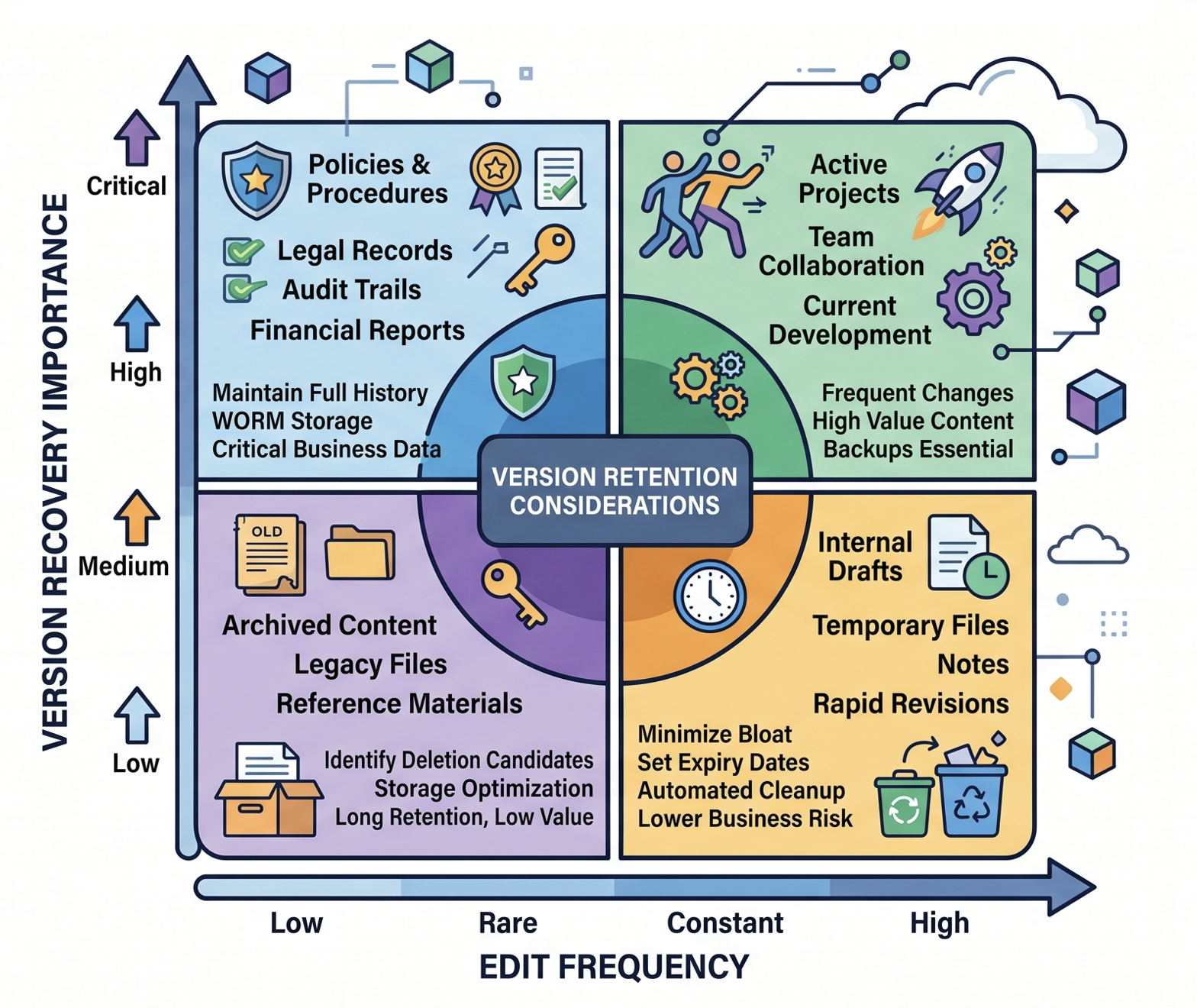
Document libraries often serve very different purposes, which means version growth patterns vary significantly. A library used for collaborative document development may generate hundreds of versions in a short period, while a reference library might change only a few times each year.
Library characteristics that influence suitable version policies include:
- Frequency of edits
- Number of contributors
- Importance of recovery
- Compliance obligations
- Storage consumption trends
A library storing frequently revised project documents may justify more version history than a library containing largely static published content.
How should business value and recovery requirements influence version limits?
Version history exists primarily to support recovery and change tracking. Before selecting any limit, you should consider what would happen if users needed to restore an earlier version after an error or unwanted change.
Questions to ask include:
- How often are previous versions actually used?
- How long after a change do users typically discover mistakes?
- Are documents collaborative or owner-managed?
- Is rapid rollback important to business operations?
If you're planning storage optimisation, consider these points before undertaking any large-scale cleanup activities like described in How to trim versions to increase available SharePoint storage.
What retention and compliance factors should be reviewed first?
Version-management decisions should never be made in isolation. Before reducing version limits, you need to understand whether the content is subject to retention requirements, regulatory obligations, legal holds or internal governance controls. A change that appears beneficial from a storage perspective may create unintended consequences if important historical information is no longer available when needed.
The first step is to identify who owns the content and whether retention policies already apply to the library. You should also understand whether compliance, legal or records-management teams have requirements that influence how long document history must remain available. In many environments, different libraries have very different obligations, which is one reason a single tenant-wide version policy rarely works well.
Where uncertainty exists, it is generally safer to validate governance requirements before changing settings. Storage savings are valuable, but they should be balanced against the operational, legal and compliance needs that version history may support.
Should high-change and low-change libraries have different policies?
Most tenants benefit from treating libraries (and the sites/teams they're contained in) differently based on how they are used. A single tenant-wide policy may be simple to administer, but it often produces unintended outcomes.
High-change libraries commonly demonstrate:
- Frequent edits
- Multiple contributors
- Active collaboration
- Faster version growth
Low-change libraries commonly demonstrate:
- Infrequent edits
- Few contributors
- Reference content
- Slower version growth
The safest approach is usually to evaluate library/site/team types individually rather than assuming identical requirements across the tenant.
Why should you pilot changes before applying them broadly?
Changing version limits across a tenant can affect large volumes of content, which makes testing especially important. While a policy may look sensible on paper, a pilot helps you understand how it performs in practice before applying it to hundreds or thousands of sites and millions of files.
Pilot programmes are particularly valuable because they replace assumptions with evidence. Rather than debating whether a policy is appropriate, you can measure the actual impact on storage growth, recovery requirements and user experience. The lessons learned from a representative sample of sites often lead to more confident governance decisions and reduce the risk of discovering problems after a broad rollout.
What reporting data should guide version-limit decisions?
The best version policies are evidence-based. Reporting helps you understand where storage is being consumed and whether version history is a significant contributor.
Useful reporting inputs include:
- Sites with the highest storage growth
- Files with unusually large version counts
- Active sites which contain many inactive files
- Ownership information, such as recently orphaned sites
Administrators often combine this information with guidance from How to save SharePoint storage with automated version management and SharePoint cleanup checklist for IT admins when planning cleanup programmes.
When should you review version policies again?
Version policies should not be treated as permanent settings. Business processes change, collaboration patterns evolve and storage growth varies over time. A periodic review should consider:
- Changes in storage growth
- New collaboration workloads
- Governance updates
- Compliance requirements
- User recovery needs
Regular reviews help prevent both excessive version growth and overly aggressive version reduction.
Conclusion
Choosing a safer SharePoint version-limit policy is less about selecting a specific number and more about balancing recovery needs, business value and storage management. Sites with different usage patterns often require different approaches. By reviewing reporting data, validating ownership, considering retention requirements and piloting changes first, you can make more informed version-management decisions.
Near the final decision stage, it can also be useful to review broader storage-recovery options described in SharePoint storage limit exceeded? 6 Proven ways to reclaim space.
FAQ
What is a SharePoint version limit?
A SharePoint version limit controls how many document versions are retained in a library before older versions are removed according to the configured policy.
What is the safest SharePoint version limit?
There is no universally safe number. The appropriate limit depends on recovery needs, business value, collaboration patterns and governance requirements.
Should every library use the same version policy?
Not necessarily. High-change libraries often have different recovery and collaboration requirements than low-change or reference-content libraries.
Can reducing version limits save storage?
In most environments, version history contributes significantly to storage consumption. The potential impact varies by tenant, library and document activity levels, but it is often the single highest impact storage cleanup option.
Should I review retention policies before changing version limits?
Yes. Retention and compliance considerations should be reviewed before making version-management changes to ensure governance requirements are understood.