

Microsoft 365 Copilot is changing how organisations interact with their data. But there’s a hidden risk many IT teams overlook.
If your SharePoint environment is cluttered with redundant, outdated, or trivial content, Copilot will use that data to generate insights, answers, and recommendations. That means poor data quality leads directly to poor AI outcomes. More data means more noise. More noise means higher storage costs and greater risk.
The good news is that the same actions that prepare your data for Copilot also reduce storage costs and improve governance.
TLDR
Preparing SharePoint for Copilot is not just about enabling AI. It requires cleaning up your data.
- Copilot uses everything in SharePoint, including outdated and redundant content
- Poor data quality leads to inaccurate or risky AI outputs
- Storage cleanup improves both AI performance and cost efficiency
- Tenants over 5TB are most affected because manual admin becomes very difficult as sites reach into the hundreds and files into the millions
- Tools like SProbot help automate cleanup and readiness
Why Copilot readiness starts with data quality
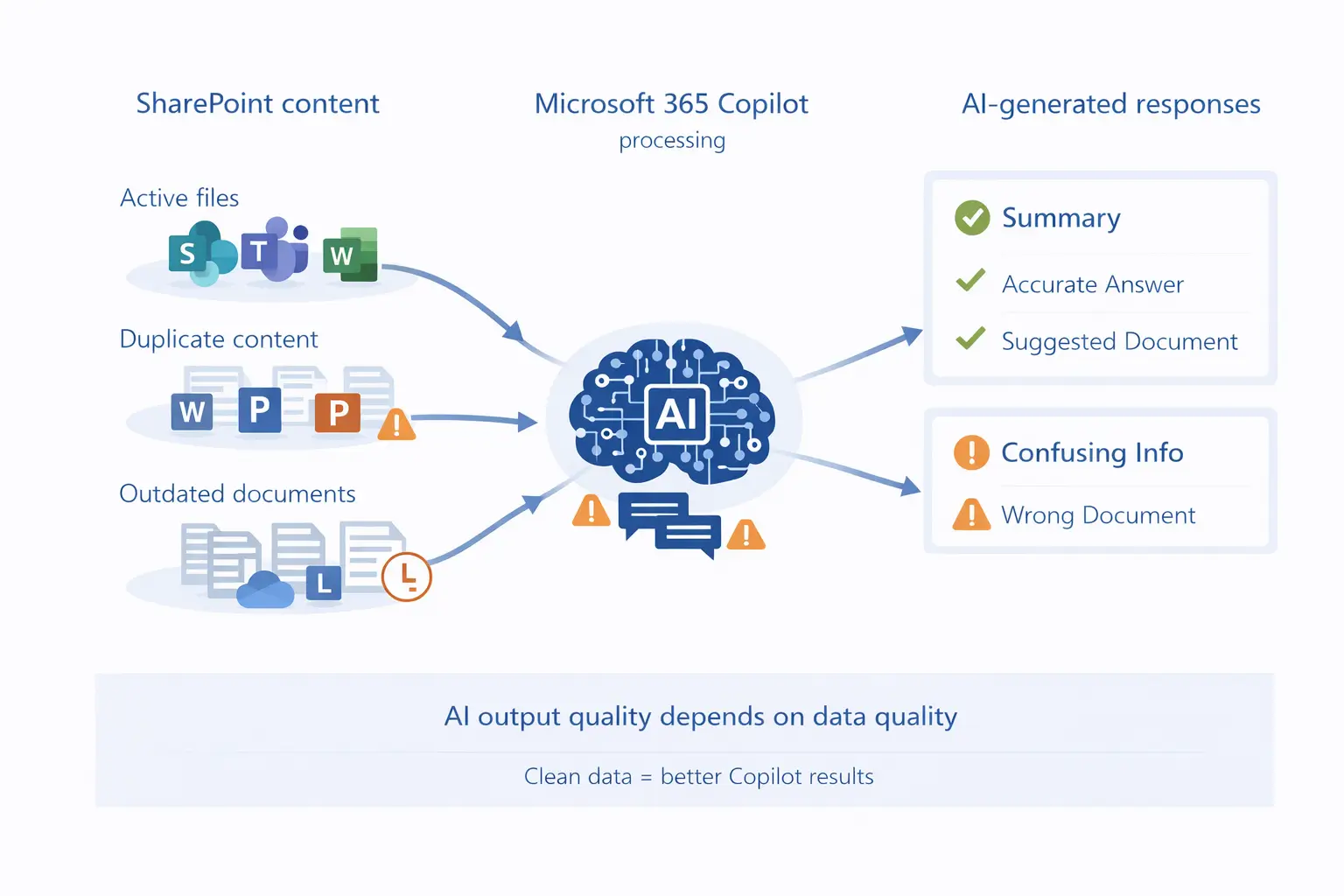
Copilot works by analysing your organisation’s content across SharePoint, Teams, and OneDrive. It does not distinguish between useful and useless data unless you structure it properly.
This creates several risks:
- Outdated documents being surfaced as current truth
- Duplicate files causing conflicting responses
- Sensitive or irrelevant content appearing in outputs
- Increased processing overhead due to data volume
The hidden connection between storage bloat and AI risk
Most organisations already know they have a storage problem. What they often miss is how closely it connects to AI readiness.
Storage bloat typically includes:
- Large volumes of inactive files
- Duplicate and version-heavy documents
- Unused SharePoint sites and Teams
- Legacy content no longer relevant
These issues do not just increase storage costs. They directly affect Copilot’s performance. For example:
- A tenant with 15 TB of content may have several terabytes of redundant or outdated data
- Copilot will still analyse and reference that data unless it is cleaned up
- This increases risk, reduces relevance, and adds unnecessary complexity
If you are already tackling SharePoint storage costs, it is worth reviewing how Teams and SharePoint sprawl creates the same underlying problem from another angle.
What Copilot ready SharePoint actually looks like
A Copilot-ready environment is not just organised. It is actively managed. It should include:
🧹 Clean and relevant content
Only content that is accurate and useful should remain active. Old or irrelevant files should be archived or removed.
👤 Structured content ownership
Clear ownership and lifecycle policies ensure content stays relevant over time.
🧦 Reduced redundancy
Duplicate files and unnecessary versions should be eliminated.
🔑 Controlled access
Permissions should reflect current organisational needs to avoid exposing outdated or sensitive content.
Practical steps to prepare your SharePoint environment
Preparing for Copilot does not require a complete overhaul. It requires focused action in key areas.
Identify redundant and outdated content
Before you archive anything, it helps to review inactive SharePoint sites and stale files. Start by analysing:
- Sites with a last activity date older than 1 year
- Files not accessed in the last 12–24 months, very often found inside active sites
Archive instead of deleting where needed
For regulated environments, archiving allows you to:
- Retain compliance
- Reduce active storage footprint
- Improve data clarity
👉 See related post: The ultimate guide to archiving SharePoint content
Reduce large file impact
Large files often account for a disproportionate share of storage, so it's a worthwhile exercise to:
- Identify files above defined thresholds (eg 50MB)
- Move or archive where appropriate
Enforce lifecycle policies
Use retention policies or governance frameworks to ensure data does not accumulate unchecked.
How SProbot accelerates Copilot readiness
Manual cleanup is possible, but it becomes impractical at scale, especially for 10–20 TB tenants.
SProbot helps by:
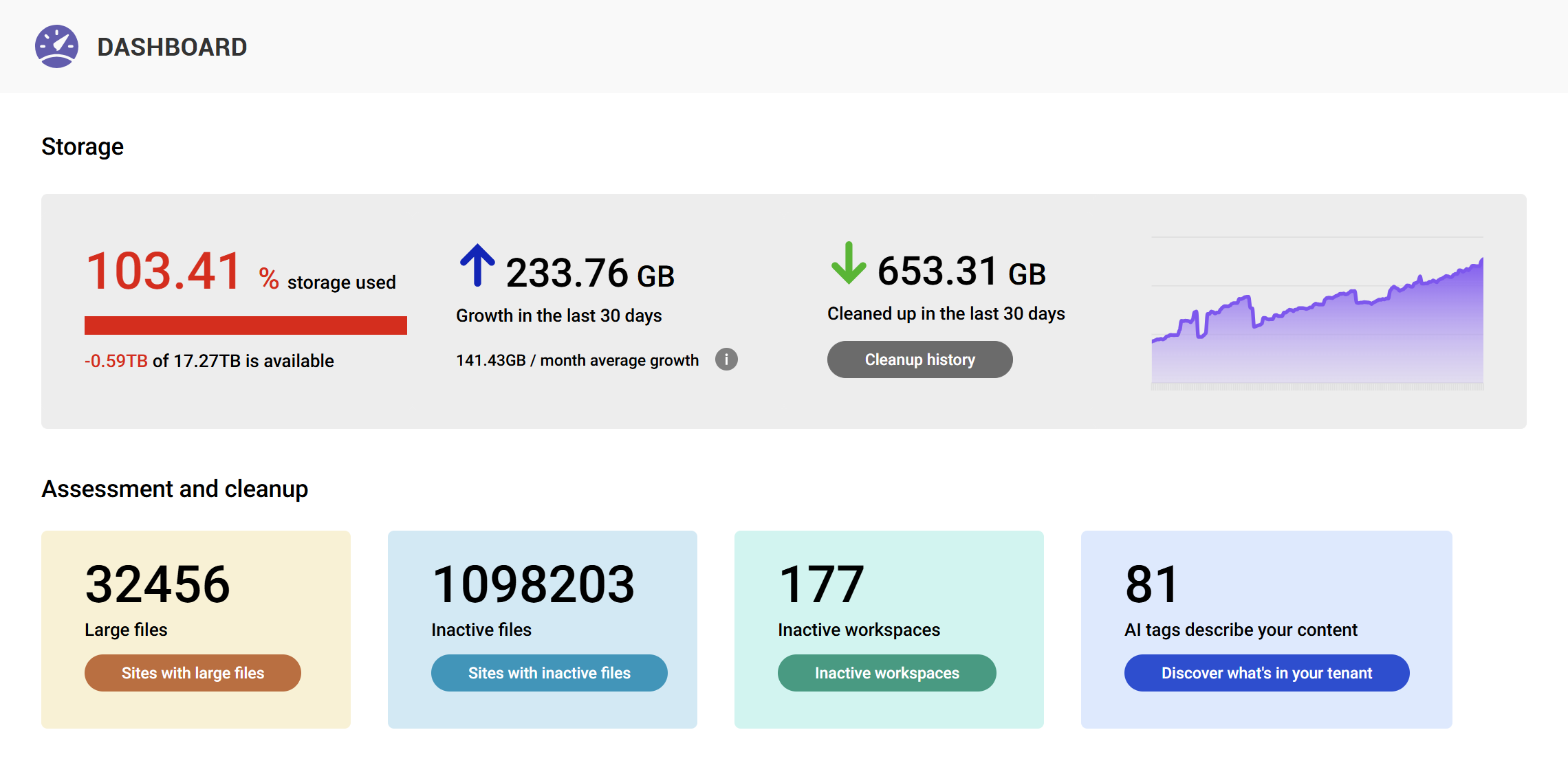
- Mapping your tenant's content composition
- Identifying inactive sites and unused data
- Highlighting large files which don't provide value
- Providing actionable reports for cleanup and optimisation
Instead of guessing where the problem is, IT teams can act with confidence.
Why mid-sized tenants should act sooner rather than later
Smaller tenants may not feel the impact immediately, and very large enterprises often have dedicated governance teams.
But mid-sized organisations sit in the most vulnerable position:
- Enough data to create risk
- Limited resources for manual cleanup
- Increasing pressure to adopt AI quickly
Acting quickly provides a double benefit:
- Prepare for Copilot adoption
- Reduce ongoing storage costs
Conclusion
Copilot readiness is not just about enabling a feature. It is about ensuring your data is fit for purpose.
Cleaning up SharePoint delivers immediate value through cost savings and governance improvements. It also lays the foundation for reliable AI outcomes. Organisations that treat content hygiene as a fundamental aspect of their operations don't just achieve storage optimisation, they gain improved AI data grounding.
FAQ
What is Copilot readiness in SharePoint?
Copilot readiness means your data is clean, structured, and relevant so AI tools can generate accurate and reliable insights.
Does storage cleanup really affect AI performance?
Yes. Copilot uses existing content. Poor quality data clutter leads directly to poor AI outputs.
How much data should be cleaned before using Copilot?
There is no fixed number, but identifying and removing redundant or outdated data significantly improves results.
Can I prepare SharePoint for Copilot manually?
You can, but it becomes difficult at scale. Automation tools help prioritise and execute cleanup efficiently.
Does cleaning up SharePoint reduce costs?
Yes. Removing unnecessary data reduces storage consumption and delays or avoids additional storage purchases.