


Many IT teams begin with scripts and manual processes because they appear cost-effective and flexible. But as SharePoint environments grow, the hidden costs of maintaining these approaches become more visible - especially in time, risk, and missed optimisation opportunities.
- DIY scripts often solve isolated problems rather than ongoing storage management
- Manual approaches require repeated effort and specialist knowledge
- Automation improves visibility, consistency, and decision-making speed
- For tenants over 10TB, automation typically produces clearer and faster ROI
Why this decision matters for growing tenants
As SharePoint environments expand, storage management becomes more than a technical task. It becomes a recurring operational responsibility that affects cost, governance, and the ability to scale effectively.
In smaller environments, manual approaches can work well enough. As data volumes increase, however, teams often begin to experience challenges with consistency, visibility, and the time required to maintain control.
At this point, the question shifts from whether to manage storage to how efficiently and predictably it can be done.
What DIY SharePoint storage management looks like in practice
Manual storage management typically combines native Microsoft 365 tools with custom scripts and periodic review processes. These approaches are often built gradually as new challenges arise.
Common activities include:
- Running scripts to extract storage usage data
- Reviewing reports in the Microsoft 365 admin center
- Identifying large or inactive content manually
- Performing cleanup exercises when storage limits are reached
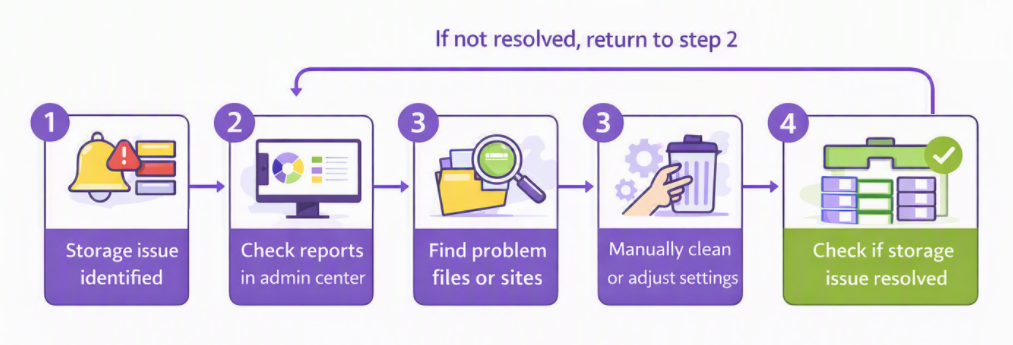
These methods can address specific issues effectively. Over time, however, they require continuous effort to repeat and maintain across a growing and changing environment.
The hidden costs of DIY approaches
Manual processes are often assumed to be low cost because they do not require additional software. In practice, they rely heavily on ongoing effort and careful oversight.
Key cost drivers include:
- Time spent gathering and interpreting data
- Repeated execution of scripts and cleanup routines
- Dependence on specialist knowledge
- Delayed identification of storage inefficiencies
These factors make it harder to maintain a consistent view of storage usage and to act quickly when new issues emerge. As environments grow, these delays can translate into higher storage costs and increased operational pressure.
How automation changes the operating model
Automation introduces a different approach to storage management. Instead of relying on periodic reviews, it provides continuous visibility and structured insights.
With a tool like SProbot, teams can:
- Identify large, inactive, or redundant content quickly
- Monitor storage trends without repeated manual effort
- Maintain consistency across sites and teams
- Act on clear and structured recommendations
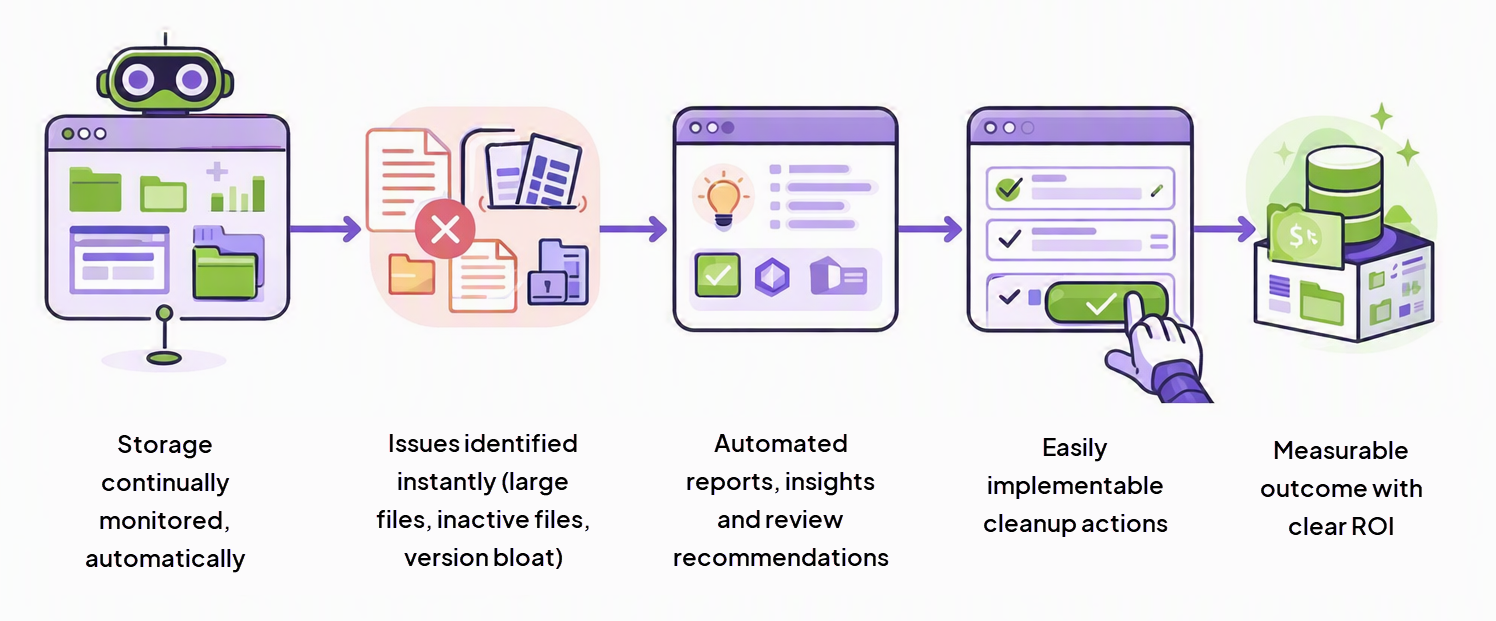
This approach reduces the need for repeated manual intervention and enables teams to manage storage more proactively.
Storage approaches compared
Where automation delivers measurable ROI
Evaluating return on investment requires looking beyond direct licensing costs. The impact of storage management decisions is also reflected in time, efficiency, and the ability to act early.
💰 Direct cost reduction
Early identification of unnecessary or redundant content reduces the need for additional storage purchases. This helps control costs before they increase.
⌛ Time savings
Automation reduces the need for manual audits and repeated scripting. Teams can focus on making decisions rather than assembling data.
🔻 Risk reduction
Consistent monitoring helps prevent uncontrolled growth and supports better governance. This reduces the likelihood of unexpected issues related to unmanaged data.
How to decide between DIY and automation
Choosing the right approach depends on how your environment is evolving and how much effort is required to maintain control.
Consider questions such as:
- How much time is spent on monitoring and reporting?
- How quickly inefficiencies are identified and resolved?
- How consistent processes are across teams and sites?
- How easy it is to explain storage-related decisions to stakeholders?
If managing storage requires increasing manual effort or produces inconsistent results, that often signals a need for a more structured approach.
How this fits into your broader storage strategy
Storage management does not exist in isolation. It connects to governance, reporting, and overall data lifecycle management.
A structured approach to storage supports:
- Better visibility into usage patterns
- Improved governance and control
- More predictable cost management
- Clearer decision-making around growth
These factors become increasingly important as environments expand and as storage decisions impact both operational efficiency and budgeting.
Conclusion
DIY SharePoint storage management can work effectively in smaller or stable environments. As data volumes and complexity increase, however, maintaining consistency and visibility becomes more challenging.
Automation provides a way to reduce effort, improve insight, and manage storage more proactively. For growing tenants, this shift supports better cost control and more predictable outcomes.
FAQ
When should I move from manual to automated storage management?
Most organisations start seeing ROI once they exceed ~10TB of SharePoint storage or when manual processes become difficult to maintain consistently.
Is manual SharePoint storage management really that costly?
While it avoids licensing costs, the time spent managing storage and the risk of inefficiencies often outweigh those savings.
How does automation reduce storage costs?
Automation helps identify redundant data, optimise storage usage, and reduce the need for paid storage add-ons.
Does automation replace governance processes?
No. It enhances governance by providing visibility, consistency and actionable insights that support better decision-making.