TLDR
Microsoft’s new pay-as-you-go (PAYG) storage model for SharePoint changes how additional capacity is consumed and billed. Instead of purchasing storage in advance, tenants can now use storage as needed and only pay for it when it is actually used.
This brings clear efficiency benefits, particularly around administration and cash flow. However, it also introduces a shift in responsibility. Storage is no longer something you plan and buy periodically — it becomes a continuous, usage-based cost that needs to be actively managed.
The implication is straightforward: PAYG simplifies how you scale storage, but increases the importance of visibility, governance, and optimisation.
What is Microsoft SharePoint pay-as-you-go storage and how does it work?
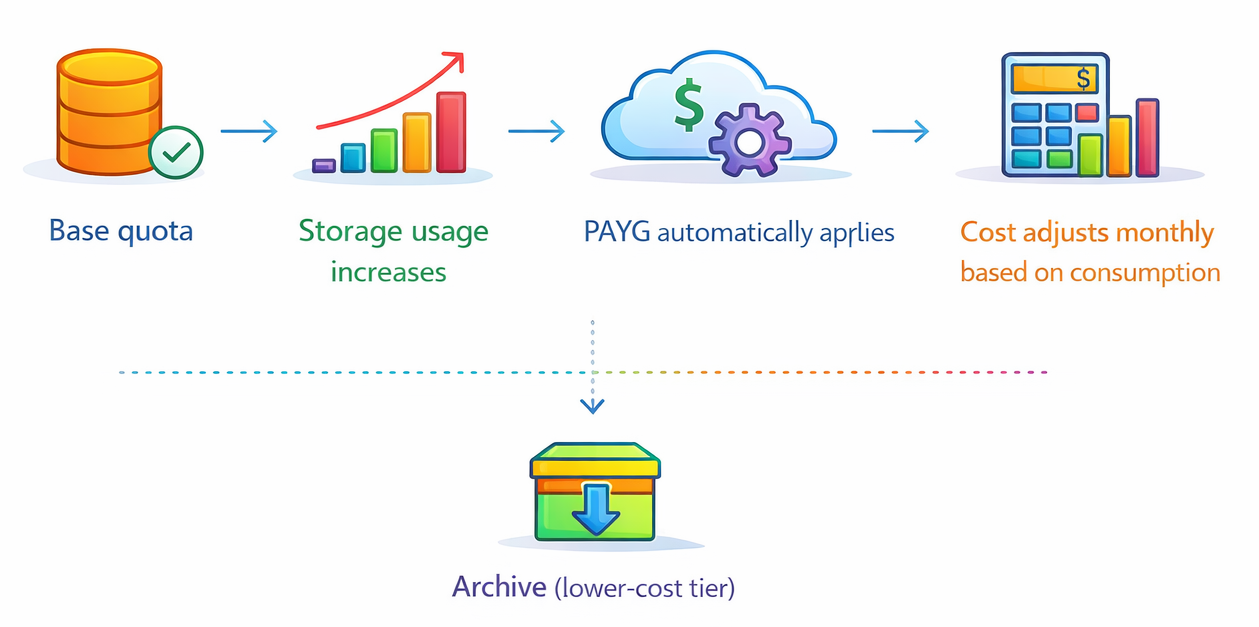
At a practical level, PAYG does not change how SharePoint stores data. It changes how additional storage is consumed and paid for.
Under the traditional model, storage was extended by purchasing fixed add-ons. These required planning, approval, and often some degree of over-provisioning to avoid running tight on space.
With PAYG, that process disappears. Storage beyond the included quota is automatically consumed and billed on a usage basis.
What stays the same
- Storage pricing per GB remains effectively unchanged
- SharePoint storage limits and architecture remain intact
- Archive still provides a lower-cost option for inactive data
What changes materially
- Storage no longer needs to be pre-purchased
- Consumption becomes continuous rather than step-based
- Billing aligns with actual usage instead of projected usage
The benefits of PAYG
The benefits of PAYG are often described in general terms like flexibility, but in practice they fall into two clear categories: operational efficiency and financial efficiency.
🔧 Benefit 1: Reduced administrative overhead
In most mid-sized tenants, storage management has historically been a recurring task:
- Someone monitors usage trends
- Growth gets estimated
- A decision is made on how much to buy
- Procurement gets involved
- Storage is purchased and allocated
That cycle repeats continuously, and it rarely runs perfectly. Teams either buy too late and rush to catch up, or too early and carry unused capacity.
PAYG removes most of that loop, with storage simply consumed as needed. There is no timing decision, no procurement dependency, and no need to actively top up capacity.
The effect is subtle but meaningful. For IT teams - especially those already stretched - it reduces:
- Routine monitoring effort
- Administrative interruptions
- Coordination between technical and procurement stakeholders
It also removes a category of low-value decision-making that doesn’t directly improve the environment, but still requires attention.
💲Benefit 2: Improved capital efficiency
The less obvious benefit, but arguably the more important one, is financial. Under the traditional model, storage is often purchased ahead of need. This is simply how risk is managed - it’s safer to have extra capacity than to run close to a limit.
The side effect is that money is tied up in storage that isn’t yet being used.
PAYG changes the timing of that spend. Instead of paying upfront and consuming gradually, you consume gradually and pay gradually. The same amount of storage may be used over a year, but the cash flow profile is completely different.
For organisations managing budgets carefully - particularly in the 10-50 TB range - this means:
- Less capital tied up in unused capacity
- More flexibility in how budget is allocated
- The ability to align cost more closely with actual usage patterns
In other words, PAYG doesn’t reduce the price of storage - but it improves how efficiently that money is deployed.
When should you use PAYG storage in SharePoint?
In practice, the model works particularly well in environments where growth isn’t perfectly predictable. Common examples include:
- Organisations going through migrations or restructuring
- Environments where departments have cyclical content generation patterns
- Teams that want to avoid recurring procurement cycles
In all of these cases, PAYG acts as a buffer. You don’t need to be precise about when capacity is required, because the system absorbs that variability. That alone removes a significant amount of friction from day-to-day operations.
What are the risks and trade-offs of PAYG SharePoint storage?
If the benefits are mostly about removing overhead and improving cost timing, the trade-off is about control. More specifically, control shifts from when storage is purchased to how storage is used.
Under the traditional model, there were natural checkpoints. Growth eventually triggered a decision: either clean up or buy more storage.
With PAYG enabled, storage growth continues without interruption. The only signal is the invoice, and that introduces a different set of risks.
Silent cost accumulation
The biggest issue is not sudden spikes, but gradual accumulation.
Most SharePoint environments contain a mix of:
- active content
- historical versions
- inactive files
- redundant or duplicate data
- obsolete or abandoned sites
Much of this is low-value, but it still consumes storage. Under PAYG, it also generates cost every month it remains in place, and over time it compounds.
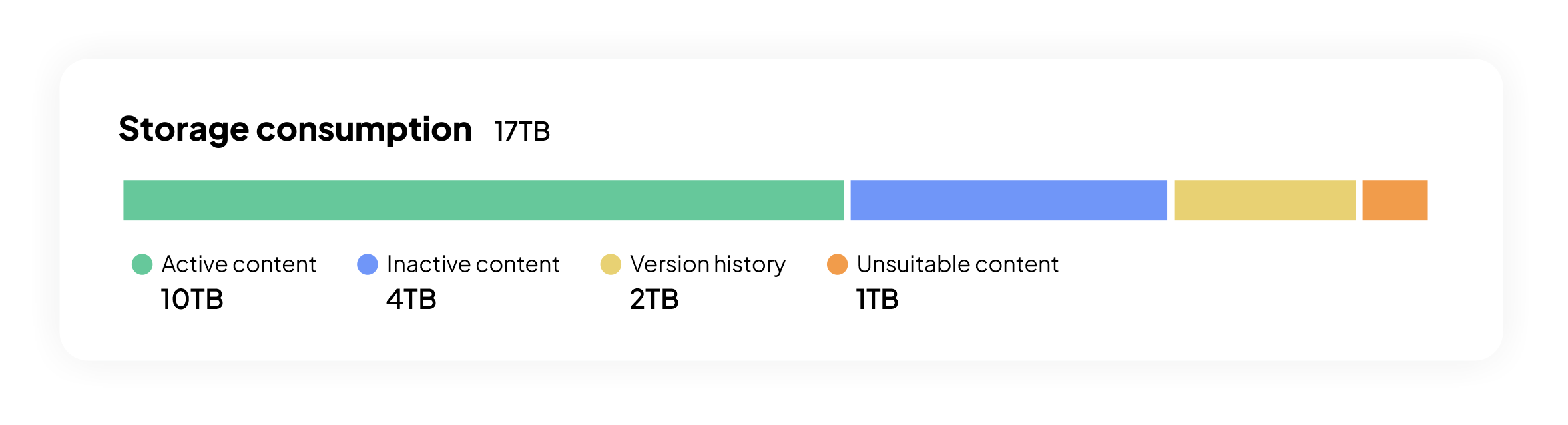
Up to 7TB may be contributing to ongoing cost without adding value
Reduced visibility
Another change is that PAYG removes the trigger (storage full notification) that typically forces investigation.
Previously, storage thresholds prompted action. Someone had to look at usage, understand what was growing, and make a decision. Without that trigger, it becomes easier for growth to continue unnoticed, particularly if costs increase gradually.
This makes reporting and visibility more important, not less.
Deferred clean-up decisions
Finally, there’s a behavioural shift. If storage is no longer a constraint, it’s easier to postpone cleanup work. That work moves from being urgent (to avoid running out of space) to optional (because nothing breaks if it isn’t done immediately).
The risk is that storage issues become a slow financial leak instead of an operational problem.
PAYG compared to other storage management approaches
The introduction of PAYG doesn’t remove other options. It simply adds another way to handle storage.
A realistic decision framework looks something like this:
In practice, most tenants will end up using a combination. PAYG handles variability. Optimisation controls cost.
Why PAYG makes SharePoint storage optimization more important
The biggest misunderstanding with PAYG is that it reduces the need for storage management. In reality, it changes the reason for managing storage from capacity constraint to cost control.
Without PAYG, optimisation is driven by capacity constraints. PAYG makes optimisation a cost efficiency process. Every GB that doesn’t need to be there is no longer just wasted space - it is unnecessary recurring spend.
How to manage SharePoint PAYG storage effectively
For most organisations, the most effective approach is not to choose between models, but to layer them.
👟 Use PAYG to remove operational friction
PAYG can be enabled to remove operational friction and avoid the need for precise capacity planning. At the same time, governance practices need to stay in place - or, in many cases, be strengthened.
📈 Maintain cost awareness
Even basic monitoring of growth trends and unexpected changes in cost is enough to identify issues early.
🧹 Focus on high-impact optimisation areas
Consistent focus on high-impact optimisation areas ensures that wastage is reduced to a minimum. Version history, inactive files, and unused sites tend to make up a large portion of unnecessary storage. These are well understood problems, but often not addressed consistently.
If you need a structured starting point, use these guides on reclaiming space and archiving inactive sites:
🔗 6 Proven ways to reclaim SharePoint storage
🔗 How to archive sites using Microsoft 365 archive
👁️Maintain tenant-level visibility
Finally, and most importantly, there needs to be visibility at tenant level. You need to be able to answer simple questions:
- Where is storage growing?
- What is consuming it?
- How much of it actually needs to be there?
Without this, PAYG becomes difficult to control.
Final perspective
Microsoft’s PAYG model is a meaningful improvement in how SharePoint storage is managed. It removes unnecessary friction, simplifies operations, and improves how storage costs flow through the business.
At the same time, it introduces an important shift: Storage is no longer something you periodically plan and purchase. It becomes something that grows continuously, and that growth has a direct, ongoing cost.
Use PAYG for what it is good at - flexibility and efficiency. But treat storage visibility and optimisation as part of normal operations, not something that only happens when a limit is reached.
Next steps: Understand your exposure before it shows up in your bill
If you’re running a 10–50 TB SharePoint tenant, the most practical next step is to get a clear picture of how your storage is actually being used.
In most cases, a significant portion of storage is tied up in areas that can be reduced - version history, inactive content, or redundant data. Under a PAYG model, those areas translate directly into avoidable cost.
A tenant-level storage assessment will show:
- Where your largest consumption areas are
- How storage is trending over time
- Which areas represent the biggest opportunities to reduce cost
Common questions about SharePoint PAYG storage
What is SharePoint pay-as-you-go storage?
SharePoint pay-as-you-go (PAYG) storage allows organisations to automatically consume storage beyond their included quota and pay only for what is used, rather than pre-purchasing fixed capacity.
It removes the need for upfront storage purchases and aligns cost directly with ongoing usage.
Do I still need to buy SharePoint storage add-ons?
No - if PAYG is enabled, additional storage is billed automatically as it is consumed.
However, traditional storage add-ons still exist and may be preferred where predictable budgeting is important and hard capacity limits are preferrable.
Is PAYG storage cheaper than add-on storage?
No. The price per GB remains broadly the same as traditional add-on storage. The benefit of PAYG is not lower pricing, but:
- improved timing of spend (no upfront cost)
- reduced administrative overhead
Does PAYG replace the need for storage cleanup?
No, and this is an important misconception.
PAYG removes the need to plan and purchase storage, but it does not reduce the cost of inefficient data. Storage that is unused, duplicated, or outdated still incurs monthly charges, which means:
- ongoing cleanup remains essential
- cost optimisation becomes more important over time
What types of data typically drive unnecessary PAYG costs?
In most SharePoint tenants, unnecessary storage usage is concentrated in a few areas:
- excessive file version history
- inactive or redundant files
- obsolete or abandoned sites
- duplicated content across teams
These areas often represent the largest cost reduction opportunities.
When should I enable PAYG storage?
PAYG is most useful when:
- storage growth is difficult to predict
- procurement processes slow down scaling
- you want to avoid upfront capacity purchases
It is less critical in highly controlled environments with stable and predictable storage usage.