

TLDR
SharePoint Advanced Management, or SAM, is Microsoft’s governance layer for managing content sprawl, content lifecycle, and oversharing in SharePoint and OneDrive. It gives administrators policies, reports, and controls such as Restricted Access Control, Restricted Content Discovery, data access governance reports, site ownership policies, inactive site policies, and site attestation workflows.
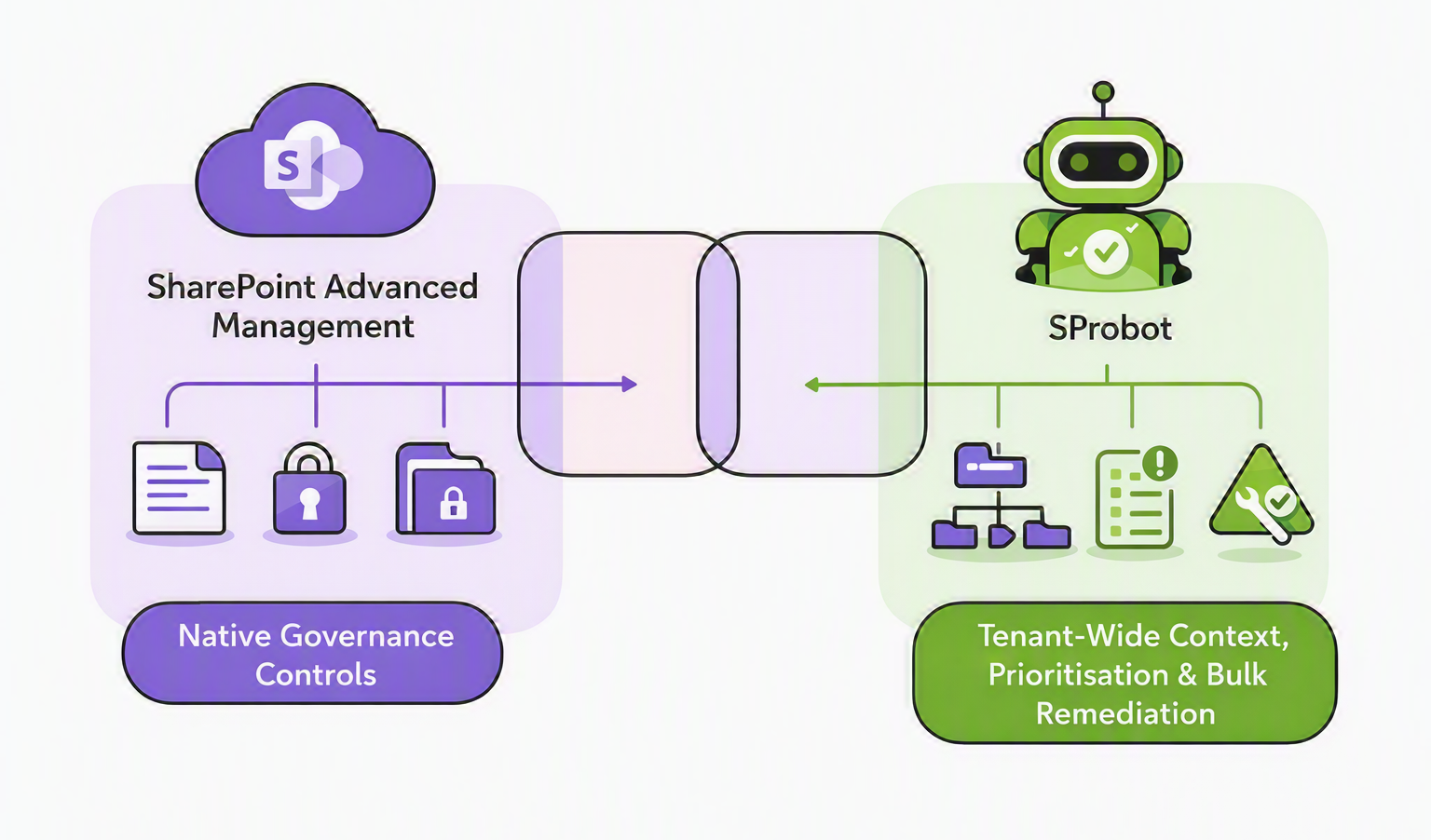
SProbot is not a replacement for SAM’s native controls, but as the tool that adds the context, visibility, and bulk actionability needed to know where those controls should be applied and how to drive tenant cleanup at scale.
- SAM is built to govern sprawl, lifecycle, and oversharing in Microsoft’s admin stack.
- SAM’s sharing links activity reports focus on links created in the last 28 days.
- SProbot is positioned to surface richer context, such as all sharing links, guest user counts side by side, ownership issues, empty or duplicate sites, inactivity, and recommended reviews.
- The strongest message for Copilot readiness is not “SAM or SProbot”, but “SAM plus SProbot” when an organisation needs native security switches and practical prioritisation across a real tenant.
Why this comparison matters
The real evaluation is rarely about whether a feature exists somewhere in the stack. The real question is whether the team can identify the right sites, understand the risk or waste around them, and take action across the estate without weeks of manual research or scripting. That is precisely why this comparison matters.
SAM belongs in that discussion because Microsoft positions it as the native governance layer for content sprawl, content lifecycle, and oversharing.
But native controls still leave a gap between “a policy exists” and “we know exactly where to apply it first, why, and in what sequence”.
If you need the bigger cost backdrop before deciding between native controls and a specialised tool, see the real cost of SharePoint storage: Capacity and pricing explained.
What SharePoint Advanced Management is designed to do
Microsoft describes SharePoint Advanced Management as the administrative governance layer for SharePoint and OneDrive. Its purpose is to help organisations manage content sprawl, manage the content lifecycle, and prevent oversharing, particularly as they prepare for Microsoft 365 Copilot and agents. In practical terms, that means SAM gives administrators policies, auditability, reports, and security controls inside the SharePoint admin centre.
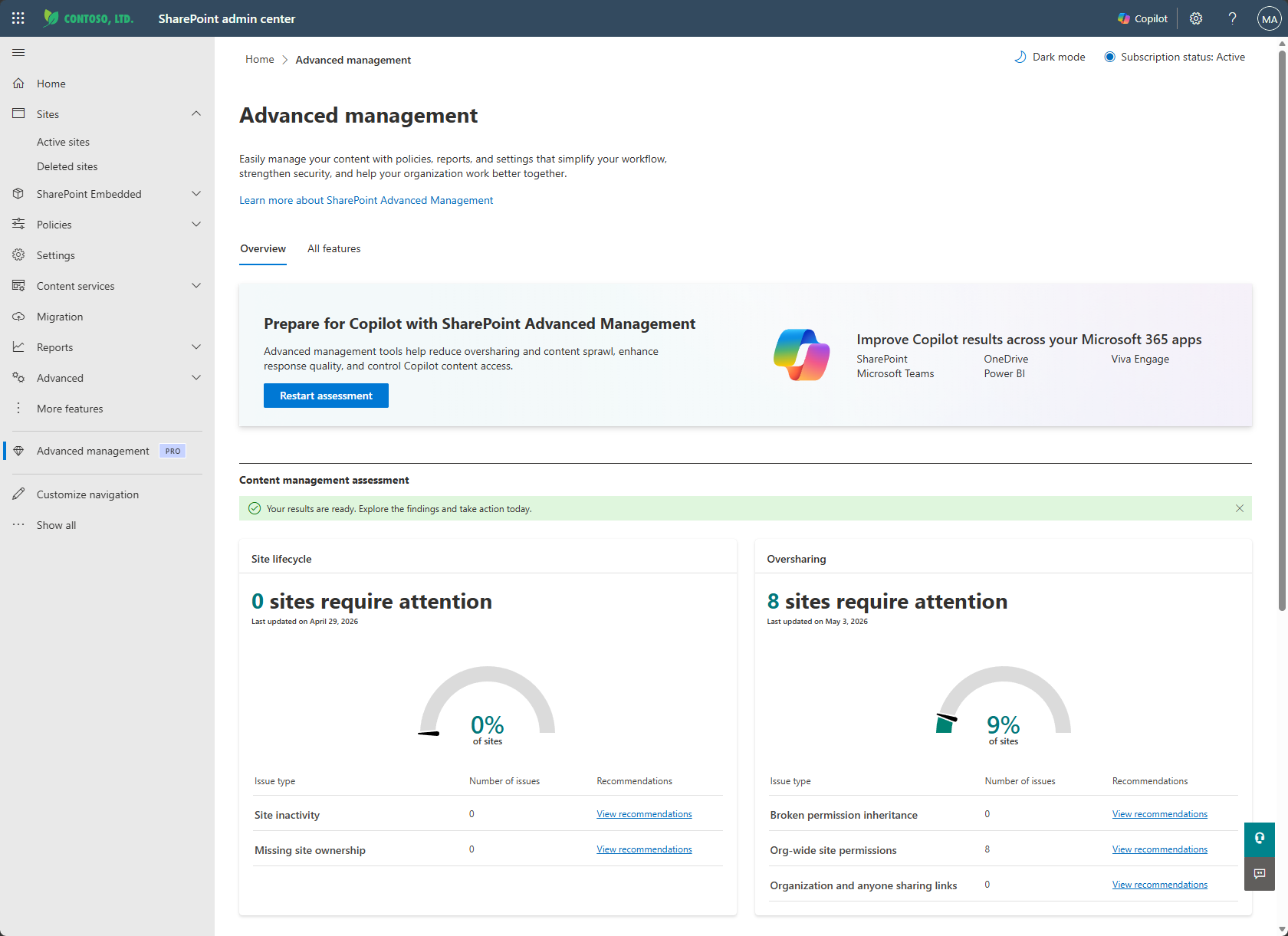
The broader SAM capability set includes:
- Site ownership policies to define and enforce responsible ownership.
- Inactive site policies and site attestation workflows to reduce content sprawl and validate whether sites still need to exist.
- Data access governance reports to identify potentially overshared or sensitive content across sites.
- Sharing links activity reports to identify sites where users created the most new links in the last 28 days.
- Restricted Access Control, which can restrict site access to specified Microsoft 365 or Microsoft Entra groups.
- Restricted Content Discovery, which can stop selected SharePoint sites from surfacing in organisation-wide search and Microsoft 365 Copilot Business Chat, unless the user had a recent interaction.
This matters because SAM is not simply a reporting add-on. It is a native governance framework that can help a tenant reduce oversharing and improve readiness for AI. That makes it highly relevant for security-conscious organisations and for teams already standardising inside the Microsoft admin experience.
Where SAM stops for storage optimisation and tenant cleanup
The reason buyers still look beyond SAM is not that SAM lacks value. It is that native governance controls do not automatically answer the operational questions that matter during a real cleanup programme. SAM is an important part of the Copilot readiness puzzle, but not as the full operational map for deciding which sites need intervention first and what action should be taken at scale.
Sharing links
A good example is sharing link analysis. SAM sharing links activity reports help identify sites where users created the most new sharing links in the last 28 days.
SProbot as a complementary extension to this can retrieve all sharing links regardless of when they were created, on demand for sites where this level of granularity is required. In a tenant where admins are trying to understand long-lived external exposure, legacy collaboration risk, or historic oversharing patterns, that distinction is significant. It changes the difference between a recent activity view and a broader tenant exposure view.
Restricted Content Discovery
The same limitation appears when you move from “reporting” to “decision support”. Restricted Content Discovery can keep selected sites out of tenant-wide search and Copilot discovery, but Microsoft explicitly warns that overusing it can reduce the content available to search and Copilot, leading to incomplete or inaccurate results.
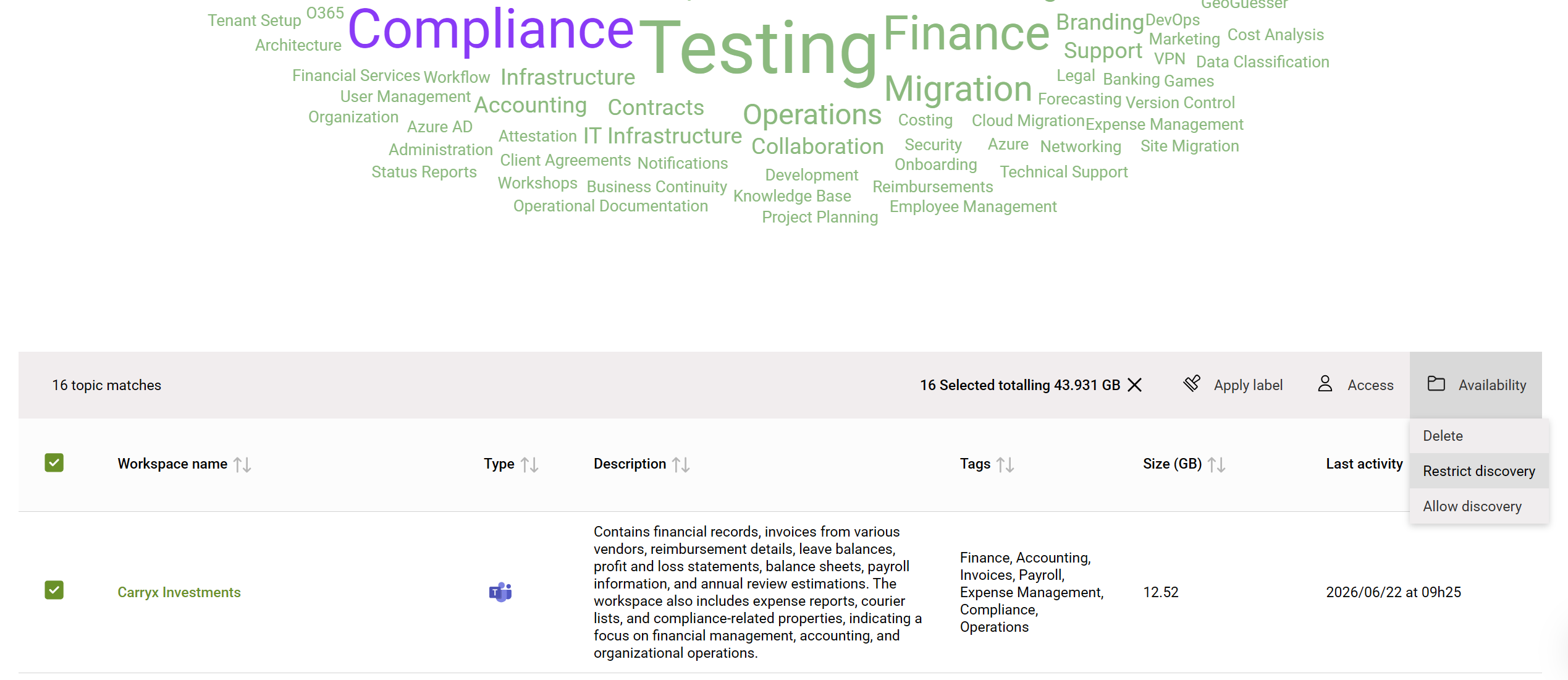
SProbot adds contextual information such as ownership, content topics, sharing links, guest users, and activity so an admin can decide more intelligently where lockdown features should be applied. In other words, SAM gives you the switch. SProbot is positioned as helping you know which switch to flip, where, and why.
Restricted Access Control
As with RCD, SProbot enables admins to apply Restricted Access Control to sites which have been identified as containing sensitive information by the content assessment, or are overexposed in guest and sharing link terms.
Where SProbot adds depth and actionability
The strongest case for SProbot is not that it duplicates Microsoft’s governance controls. It is that it adds richer context, a more unified operating view, and easier remediation steps around the exact areas that administrators struggle to prioritise.
Side-by-side sharing link and guest user views
For example, SProbot evaluates site security status from more than one angle by showing sharing-link counts and guest-user counts side by side and in the context of the wider tenant. That means an admin is not just seeing a raw list of links. They are seeing a prioritised picture of how exposed a site is relative to peers.
Bulk actioning
Secondly, some SAM scenarios still require custom scripting or tedious manual work in bulk. For example, marking many sites as restricted. SProbot enables actions in bulk by combining content assessment with an admin actions toolbar, so admins can identify a category of sites, such as those containing legal-related content, and apply restrictions across all of them rather than toggling settings one by one. That matters because most real-world cleanup programmes succeed or fail on operational throughput, not on whether a feature exists in principle.
Broader view of the tenant
Third, SProbot gives broader tenant intelligence beyond native reporting, including no-owner or no-group sites, empty sites, test sites, duplicate-named sites, inactive sites, fast-growing sites, and large or inactive file reporting inside sites. That broader visibility is relevant not only to security, but also to storage optimisation, because it helps administrators identify the content patterns that actually drive bloat and governance debt.
Recommended reading:
🔗 How can I monitor and manage my SharePoint storage efficiently?
🔗 Comparing Native SharePoint Reporting vs. Third-Party Tools
Why “SAM vs SProbot” is the wrong framing
A simplistic competitive framing suggests you must choose either Microsoft’s native governance features or a third-party tool. This is unnecessary, because SProbot does not replace SAM’s native capabilities, but enhances them.
SAM provides the underlying security switches, while SProbot provides the map and the automation to apply those switches effectively across a tenant.
SAM is especially strong when you want policy-backed governance inside the Microsoft ecosystem. SProbot becomes compelling when the tenant needs deeper context, operational prioritisation, multi-factor visibility, and lower-friction execution around cleanup, security, and storage optimisation work. For many mid-sized tenants, the practical answer is not “SAM or SProbot”. It is “Where does SAM provide enough native value on its own, and where do we need SProbot to make those controls workable at scale?”
🔗 See also: Preparing SharePoint for Microsoft 365 Copilot
When to choose SAM alone and when to choose SAM plus SProbot
If your immediate need is to stay within Microsoft’s native governance model, enable stronger admin controls, and improve Copilot readiness with built-in policies and reports, SAM is a serious capability set. SAM is available when at least one user in the organisation has a Microsoft 365 Copilot licence assigned, or when the organisation purchases the SharePoint Advanced Management Plan 1 add-on on top of the required base subscriptions.
Choose SAM plus SProbot when the governance challenge is no longer just enabling controls, but actually cleaning up a large, messy, fast-changing tenant. SProbot is the layer that enriches the native governance picture with broader reporting, richer context, and more practical actionability. For mid-sized tenants with limited admin time, that can make the difference between having governance features available and having a governance programme that actually progresses.
Conclusion
SharePoint Advanced Management is Microsoft’s native governance layer for handling sprawl, lifecycle, and oversharing in SharePoint and OneDrive, and it provides meaningful capabilities for organisations preparing for Microsoft 365 Copilot. Yet native controls are only one part of the decision. For many teams, the harder challenge is understanding which sites need intervention, what kind of intervention they need, and how to apply controls efficiently across the tenant. SProbot is the perfect companion tool for this.
FAQ
What is SharePoint Advanced Management actually for?
Microsoft says SharePoint Advanced Management is for managing content sprawl, managing the content lifecycle, and preventing oversharing in SharePoint and OneDrive, especially as organisations prepare for Microsoft 365 Copilot and agents.
Does SharePoint Advanced Management include sharing-link reporting?
Yes. Microsoft documents sharing-links activity reports as part of SAM’s data access governance reporting. Those reports identify sites where users created the most new sharing links in the last 28 days.
Does Restricted Content Discovery remove permissions from a site?
No. Restricted Content Discovery does not change existing permissions. Users with access can still open files on sites where RCD is enabled, even though the site is be hidden from organisation-wide search and Microsoft 365 Copilot discovery.
How is SProbot positioned differently from SAM?
SProbot adds richer context and easier actionability. It can analyse the content composition in a tenant to identify where eg HR, Legal, Finance and other content resides, can retrieve all sharing links, show guest-user counts alongside sharing links, giving more contextual security status, and make some bulk actions easier.
Is this really a “SAM vs SProbot” decision?
No, SProbot does not replace SAM’s native capabilities but enhances them, particularly for Copilot readiness work where native controls need stronger tenant-wide context and execution support.