


Answer in brief
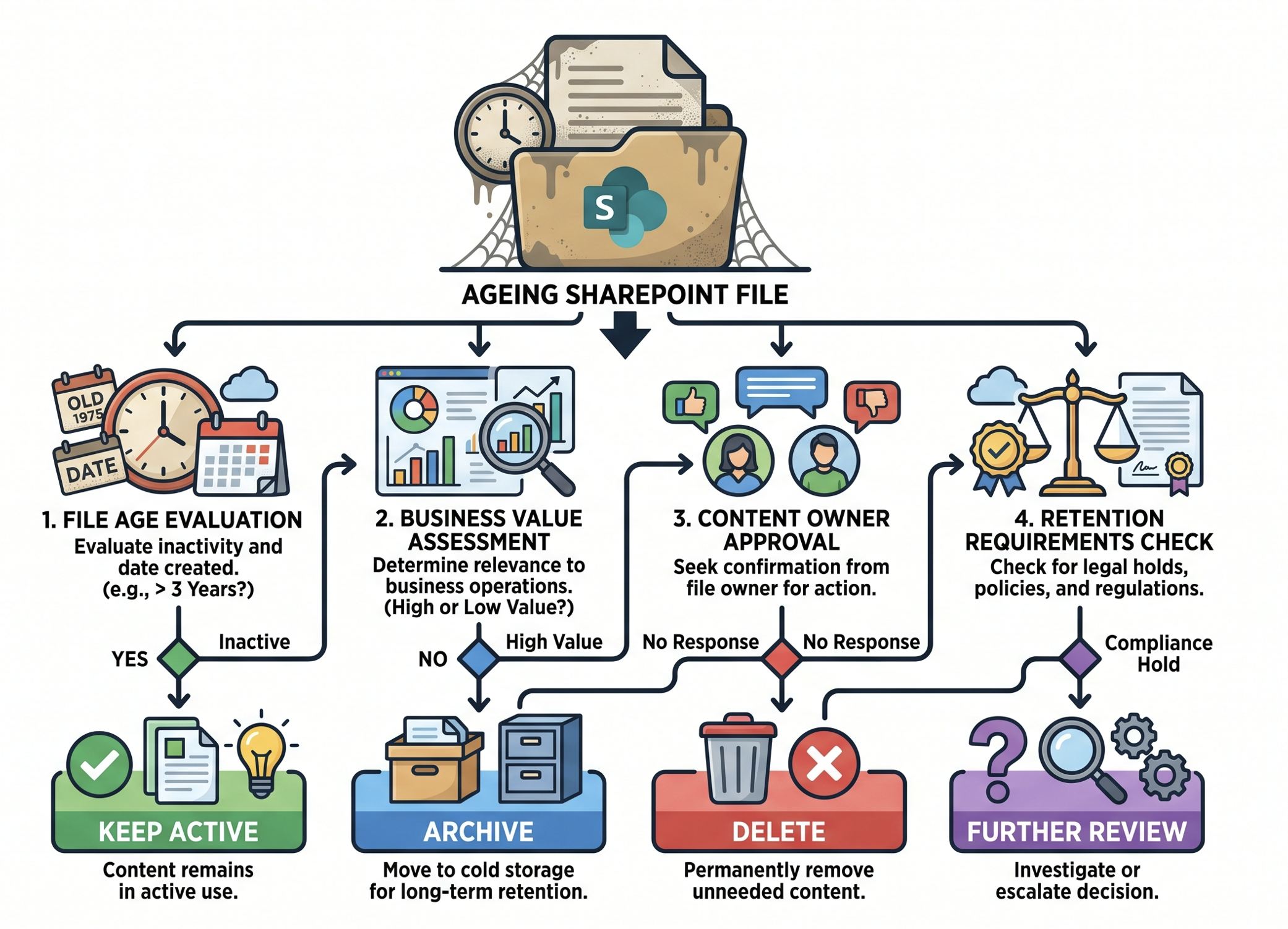
Many SharePoint administrators search for ways to delete files older than a certain age, but age alone does not determine whether a file should be removed. The most effective approach is to use file age as a review signal, then evaluate business value, ownership, retention requirements and storage impact before taking action.
A practical review process should:
- Identify files older than a selected threshold
- Gather ownership and activity evidence
- Review retention requirements
- Decide whether to keep, archive or delete
- Record approvals before bulk actions
- Validate reclaimed storage after cleanup
Before creating an age-based rule, review When to delete SharePoint files instead of archiving them to establish a consistent decision framework.
Why file age is only one piece of the picture
A document that has not changed for a year may still be critical to the business, while a file created last week could already be obsolete. The problem with age-based cleanup is that dates are easy to report on but business value is not.
A safer approach combines:
- Modified date
- File size
- Ownership
- Business purpose
- Retention requirements
- Future reference value
This reduces the risk of removing content simply because it appears old.
When to review files older than 30 days?
Thirty days is most commonly associated with temporary operational content. Examples include exports, generated reports, integration outputs, migration staging libraries and working folders used during short-term projects.
The threshold works best when everyone agrees the content was intended to be temporary from the start. It becomes risky when applied to general-purpose document libraries because even a month-old file can still be actively referenced.
Typical 30-day candidates include:
- Temporary exports
- Test files
- Migration artefacts
- Generated reports
- Staging documents
🔗 For broader inactive-content discovery, see Free up SharePoint storage by finding and removing inactive files.
When to review files older than 90 days?
Ninety days aligns closely with quarterly business cycles and is one of the most common inactivity review periods used by administrators. Content that has not been touched in an entire quarter often becomes a useful candidate set for owner review.
A ninety-day report can help you identify:
- Completed project documents
- Superseded drafts
- Duplicate content
- Temporary collaboration material
- Unused working documents
This threshold should still trigger review rather than deletion. Many approved policies, procedures and reference documents can remain unchanged for far longer than three months while continuing to deliver value.
Review storage impact before removing content
The biggest cleanup opportunities are not only the oldest files. In many tenants, a relatively small number of large documents consume a disproportionate percentage of total storage.
Before applying a file-age rule, compare storage impact against age.
Find the biggest opportunities first
If a 20 MB document is three years old and a 12 GB media file is six months old, the larger file is usually the higher-priority review candidate.
Focus on:
- Large inactive files
- Duplicate content
- Version-heavy files
- High-growth sites
Build an evidence-based review list
Use reporting data to determine which files are old, inactive and consuming meaningful storage before owners are asked to make decisions.
When to review files older than 180 days?
One hundred and eighty days, or roughly six months, is a common governance threshold because it provides enough time to distinguish genuinely inactive content from normal gaps in project activity.
By six months, many organisations find they can:
- Archive completed project content
- Remove temporary collaboration artefacts
- Consolidate duplicate information
- Retire obsolete working documents
A six-month threshold is often more suitable than ninety days for engineering, legal, procurement and seasonal business processes, where activity naturally occurs in longer cycles.
When to review files older than 1 year?
A one-year threshold is commonly used for lifecycle reviews because it covers annual business cycles and produces a manageable archive-candidate list. It is often more appropriate for long-term governance initiatives than aggressive cleanup exercises.
Files older than one year typically fall into four groups:
- Active reference content
- Archive candidates
- Duplicate or obsolete content
- Content requiring policy review
The goal at this stage is usually archive-versus-delete decision making rather than simple cleanup.
🔗 For archive planning guidance, see SharePoint file-level archiving: How to decide what to archive.
What should you check before deleting older files?
A successful cleanup process protects valuable information while reducing storage growth. The review stage matters far more than the chosen age threshold.
Before deleting any files, confirm:
- A business owner has reviewed the content
- Retention requirements are understood
- Legal or compliance constraints have been considered
- Dependencies have been identified
- Recovery expectations are documented
- Archive options have been evaluated
The review process should always happen before bulk deletion.
Delete, archive or keep?
Age should identify candidates rather than determine outcomes. A structured decision framework helps ensure consistency across sites and business units.
📁 Keep
Keep the file active when people still use it, processes depend on it, or it remains important for operational or reference purposes.
🗄 Archive
Archive the file when active collaboration is no longer necessary but future access may still be required.
🗑 Delete
Delete the file only when there is no remaining business value, ownership approval has been obtained and disposal is permitted.
🔼 Escalate
Escalate uncertain content for review rather than forcing a decision based purely on file age.
If you need a complete cleanup workflow, see SharePoint cleanup checklist for IT admins.
Conclusion
The most effective file-age review thresholds are usually 30 days, 90 days, 180 days and 1 year because they align with the way operational teams, quarterly reviews, governance programmes and annual lifecycle processes typically work.
The important point is not selecting the right age threshold. The important point is ensuring that age triggers a review process and potential archiving rather than an automatic deletion process. Business value, ownership, retention requirements and storage impact should always drive the final decision.
FAQ
What is the most common SharePoint file-age threshold?
Ninety days is one of the most common review thresholds because it aligns with quarterly business cycles and often identifies inactive working content without being overly aggressive.
Should I automatically delete SharePoint files older than 30 days?
In most environments, no. Thirty days can work for temporary operational content, but it is generally unsuitable as a blanket deletion rule across all document libraries.
Is 180 days a better threshold than 90 days?
Not necessarily. Ninety days is useful for identifying inactive working material, while 180 days is often more appropriate for governance reviews and longer project cycles.
Should files older than one year be archived?
Not always. Some files remain active reference content for many years. One year is best used as a review trigger rather than an archive rule.
What should I check before deleting old SharePoint files?
Review ownership, business purpose, dependencies, retention requirements, recovery expectations and archive options before taking action.