

Answer in brief
Delete a SharePoint file when it is genuinely unnecessary and approved for disposal. Archive it when it no longer needs to remain active but may still have business, legal, historical, or user value. Keep it active when people or business processes still depend on it.
Before deleting a file, confirm whether:
- It is a duplicate, test file, obsolete draft, or other low-value content
- The business owner agrees that it is no longer needed
- Retention or disposal requirements apply
- Users may need it for future reference
- Archiving would be safer than permanent removal
Inactivity is a useful signal, but it is not a deletion instruction. Start by finding content that has fallen out of use with Free up SharePoint storage by finding and removing inactive files, then apply a consistent decision process before taking action.
The quick decision rule
A reliable decision starts with business value, not file age alone. A document that has not been opened recently may be unnecessary, but it may also be a completed record, an approved deliverable, or information someone expects to retrieve later.
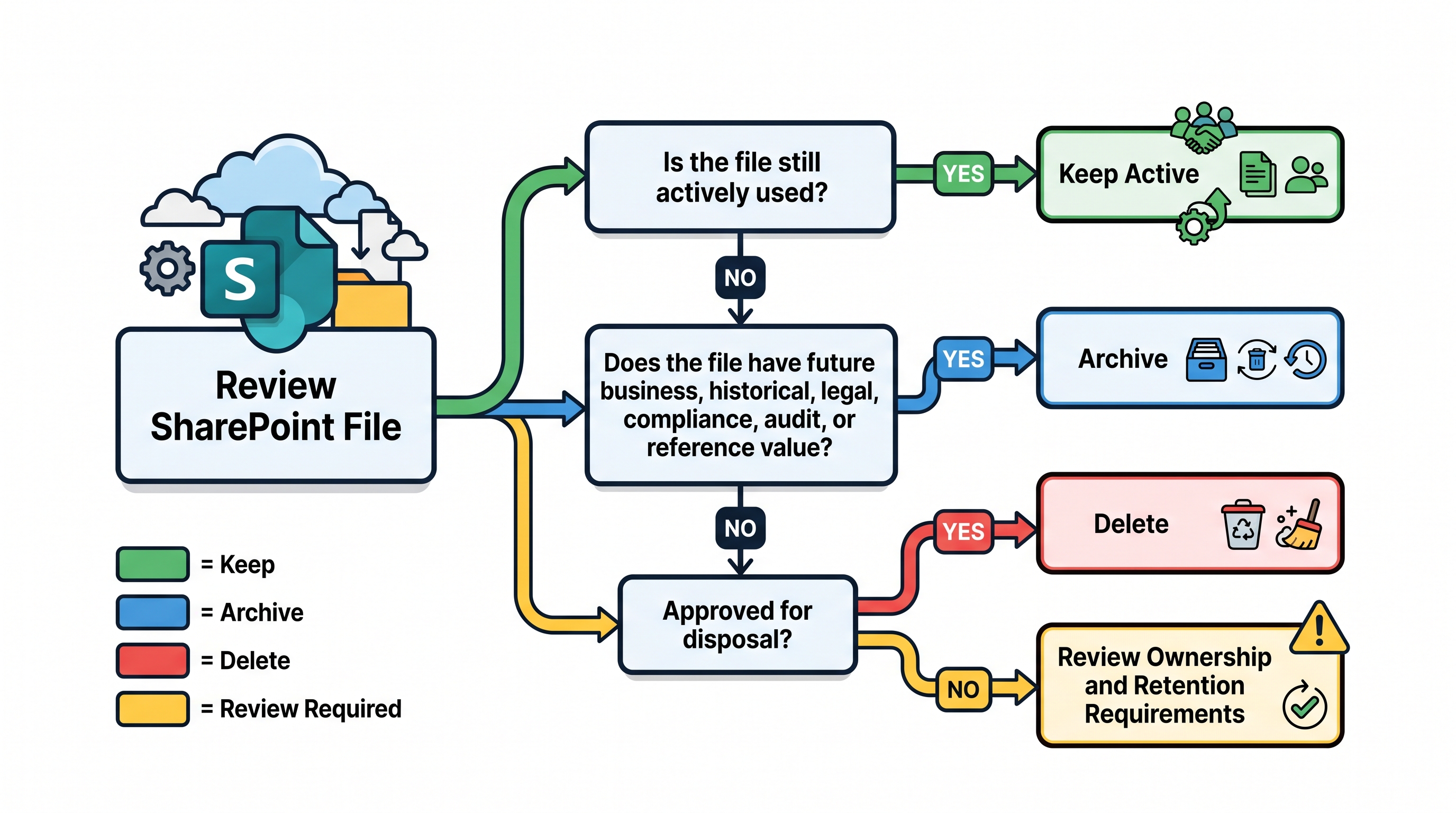
Use this sequence:
- Keep the file active if people or business processes still use it.
- Archive it if it is inactive but retains future value.
- Delete it if it has no remaining value and disposal is permitted.
- Pause for review if ownership, retention, or future value is unclear.
This approach prevents storage pressure from turning into rushed deletion. If storage is already close to capacity, SharePoint storage limit exceeded? 6 proven ways to reclaim space can help you assess deletion alongside other cleanup options rather than treating it as the only available response.
When deletion makes sense
Deletion makes sense when a file has no continuing operational, historical, legal, or reference value. The decision should be based on what the file contains and why it exists, supported by owner approval and any required retention checks.
Duplicate files
Duplicate files consume storage without adding distinct value. They often appear when users download, rename, copy, or re-upload documents instead of working from a shared source.
Before removing a duplicate, identify the authoritative copy. Check whether the files are truly identical, whether either copy contains unique changes, and whether links, workflows, or users depend on a particular location.
Test and temporary content
Test documents, migration samples, export files, generated reports, and temporary working material can remain long after their original purpose has ended. These files are usually reasonable deletion candidates once you confirm that the related test, migration, or short-term task is complete.
Be careful with folders labelled “temporary” or “test.” A label is not proof that every file inside is disposable. Review the contents and ownership before applying a bulk decision.
Superseded drafts
An obsolete draft may no longer be useful once the approved version is available and the earlier copy has no audit or historical purpose. Clear naming and ownership make this decision easier.
Do not assume that every earlier version should be deleted. If the document’s development history matters, or if the content is governed by a retention requirement, keeping or archiving it may be safer.
Trivial or non-work-related files
Screenshots, personal downloads, outdated event material, and other content with no business purpose can become unnecessary storage overhead. These files may be suitable for deletion after an owner review confirms that they are not part of a legitimate record or working process.
Content approved for disposal
Some files become eligible for deletion through an established records or information lifecycle process. In these cases, the disposal decision should still be documented so that you can explain what was removed, who approved it, and which rule or process applied.
A broader cleanup exercise should bring these decisions together rather than treating storage reduction as a series of isolated deletions. SharePoint cleanup checklist for IT admins provides a practical structure for reviewing storage, versions, inactive content, and lifecycle choices in the correct order.
When archiving is safer
Archiving is generally safe when a file no longer belongs in an active collaboration space but could still be useful later. It reduces day-to-day clutter while preserving content that has a defensible reason to remain available.
Typical archive candidates may include:
- Completed project documents that could support later work
- Final deliverables that users may need to reference
- Historical departmental records
- Closed operational files with ongoing reference value
- Content retained for audit, contractual, or governance reasons
- Material whose owner wants it preserved but no longer actively available
The key difference is remaining value. If you can identify a credible future reason for retrieving the file, deletion may be premature.
Archiving should also be deliberate. Moving everything inactive into an archive simply relocates the problem and can create a large collection of poorly understood content. Before choosing candidates, define what qualifies for archiving, who owns the decision, and how people will regain access when necessary.
If you are considering Microsoft’s archive capabilities, Microsoft 365 Archive: File-level archiving provides useful context on the direction of file-level archiving. For a wider comparison of archive approaches, see SharePoint file-level archiving: How to decide what to archive.
When to keep content active
A file should remain active when it supports current work, even if it is not edited frequently. Usage reports help you investigate activity, but they cannot fully capture the operational importance of a document or the consequences of moving it.
Keep content active when:
- A current project, team, or process depends on it
- Users still collaborate on or regularly reference it
- A workflow, integration, report, or published link depends on its location
- It forms part of a working knowledge base
- Moving it would interrupt access or create unnecessary friction
- Its owner confirms that it remains operationally important
Consider context as well as activity. A policy may only be read during a particular event. A template may be used quarterly. A technical document may become important only when an incident occurs. Low frequency does not automatically mean low value.
How retention and compliance affect the decision
Retention requirements can limit whether content may be deleted, even when it appears obsolete or inactive. Check the rules that apply to the content and involve the appropriate records, compliance, governance, or legal stakeholders when the answer is unclear.
Before approving deletion, confirm:
- Who owns the file or business process
- Whether a retention requirement applies
- Whether the file supports an audit, investigation, contract, or dispute
- Whether an approved disposal process exists
- Whether a replacement or final record has been preserved
- Whether the decision and approval need to be documented
This is not a substitute for legal or compliance advice. Your organisation’s policies and obligations should determine how retained records are classified, protected, and disposed of.
Why age and inactivity are not enough
Age and inactivity help you prioritise investigation, but neither tells you why a file exists. A five-year-old duplicate and a five-year-old signed agreement may look similar in an activity report while requiring completely different decisions.
Treat activity data as evidence, not authority. Combine it with:
- Ownership information
- File type and location
- Business purpose
- Last modified and last accessed signals
- Size and storage impact
- Retention requirements
- Relationships to sites, projects, and processes
File size also needs context. Removing one large, unnecessary export may produce a meaningful result, while reviewing thousands of small files may create considerable effort for limited storage benefit. Use reporting to prioritise candidates by both risk and potential impact.
If capacity planning is part of the review, SharePoint storage calculator: Estimate your tenant's needs can help you compare current requirements with expected storage needs before deciding whether cleanup, archiving, or additional capacity is the better response.
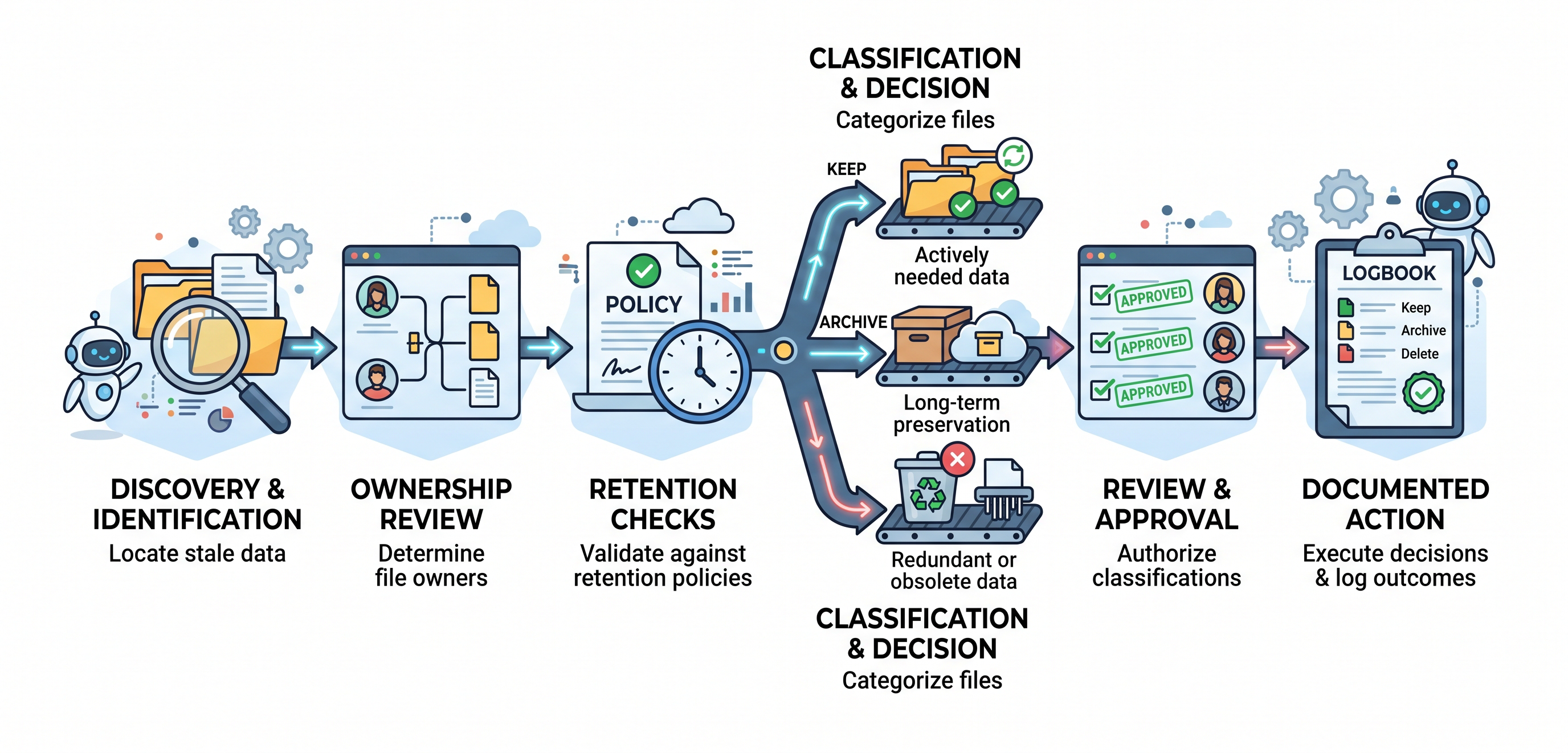
A practical review workflow
A consistent workflow makes cleanup easier to explain, repeat, and govern. It also gives content owners a clear role in the decision instead of asking IT to determine business value from technical metadata alone.
Step 1: Identify possible candidates
Start with inactive files, duplicate content, unusually large files, obsolete working areas, and content connected to completed projects. At this stage, you are creating a review list, not a deletion list.
Step 2: Establish ownership
Determine which person, team, or business function is responsible for the content. If no owner can be identified, route the file through your agreed orphaned-content or governance process rather than deleting it by assumption.
Step 3: Check retention and dependencies
Confirm whether retention requirements apply and whether links, workflows, integrations, reports, or users depend on the file. A file may appear inactive because people consume it through another process.
Step 4: Assess remaining value
Ask whether the content still supports current work, could reasonably be required later, or has historical, contractual, governance, or reference value. Record uncertainty instead of forcing a premature choice.
Step 5: Choose keep, archive, delete, or review
Assign one clear outcome:
- Keep active when the file supports current work
- Archive when future value remains but active access is unnecessary
- Delete when no value remains and disposal is permitted
- Review when ownership, retention, or value cannot yet be confirmed
Step 6: Obtain approval
Ask the owner or designated decision-maker to approve archive and deletion actions. For sensitive or governed content, include the appropriate records, compliance, or legal stakeholder.
Step 7: Execute and document the outcome
Record what was kept, archived, or deleted, along with the approver and relevant decision basis. Documentation makes later questions easier to answer and improves the next review cycle.
Common mistakes to avoid
Poor cleanup outcomes usually come from weak decision criteria rather than the deletion action itself. Avoid rules that appear efficient but ignore ownership, business purpose, dependencies, or retention obligations.
Deleting everything older than a fixed date
A simple age threshold is easy to apply but cannot distinguish between outdated clutter and an important record. Use age to create a review population, then assess value and approval before deletion.
Treating every inactive file as unnecessary
A file may be inactive because a project has ended, because access is seasonal, or because it is held for future reference. Inactivity tells you where to look, not what to remove.
Archiving everything to avoid decisions
Archiving can reduce immediate risk, but an archive filled with duplicates, temporary files, and trivial content still requires storage and management. Remove clearly unnecessary content before archiving files with genuine remaining value.
Letting IT decide business value alone
Technical teams can report file activity, size, age, location, and ownership signals. Business owners are better placed to decide whether the content still matters. The strongest process combines technical evidence with accountable owner review.
Starting with the largest library
A large library may contain important active content. Prioritise cleanup by opportunity and confidence, not size alone. Look for areas where inactivity, low business value, owner agreement, and meaningful storage impact overlap.
Conclusion
Deleting files can reduce SharePoint storage and clutter, but the safest decision is based on value, ownership, retention, and future need rather than age alone. Keep active content accessible, archive content with remaining value, and delete only content that is genuinely unnecessary and approved for disposal.
Before taking irreversible action, build an evidence-based review list and involve the people who understand the content. [internal link to: How can I monitor and manage my SharePoint storage efficiently?] explains how ongoing visibility can make these decisions part of a repeatable storage-management process rather than a once-off emergency cleanup.
FAQ
Should I automatically delete inactive SharePoint files?
No. Inactivity should be used to identify files for review, not as automatic proof that they are safe to delete. Confirm the file’s purpose, owner, retention requirements, dependencies, and remaining value before removing it.
What is the difference between deleting and archiving a SharePoint file?
Deleting is appropriate when a file has no remaining value and disposal is permitted. Archiving preserves a file that no longer requires active access but may still have business, legal, historical, governance, or user value.
Which SharePoint files are usually candidates for deletion?
Likely candidates include confirmed duplicates, temporary files, test content, obsolete drafts, trivial material, non-work-related files, and content formally approved for disposal. Every candidate should still pass ownership and retention checks before deletion.
Should I archive every file that has not been used recently?
No. Archiving every inactive file can preserve duplicates, obsolete drafts, and other low-value content unnecessarily. Review inactive files first, delete content with no remaining value, archive content with a credible future purpose, and keep operational content active.
Can storage pressure justify deleting files immediately?
Storage pressure should trigger prioritised review rather than uncontrolled deletion. Assess inactive files, large unnecessary files, version growth, and archive candidates, then choose the actions that reduce storage without exposing valuable content to unnecessary risk.
Who should approve the deletion of SharePoint files?
The relevant content or business owner should normally confirm that a file is no longer needed. Records, compliance, governance, or legal stakeholders may also need to participate when retention requirements, contractual obligations, audits, investigations, or formal disposal processes apply.