


Answer in brief
File-level archiving in Microsoft 365 Archive moves individual SharePoint files to a cold storage tier while the rest of the site stays active. To archive inactive files automatically, SharePoint Advanced Management has an inactive files policy, which archives files by their last access date. It's in public preview, PowerShell only, with general availability planned by the end of 2026.
- Anyone with edit permission can archive a file by hand, on any site where Microsoft 365 Archive is enabled.
- Archived files no longer use your active storage quota. Archive storage is charged at $0.05 per GB a month, and only for the part of your storage that's over quota.
- Reactivating a file is free and immediate, but the file can't be archived again for 120 days.
- The inactive files policy needs a SharePoint Advanced Management entitlement and archives by last access date, from 6 to 48 months. Access before July 2025 may not have been recorded.
- Archiving isn't deletion: retention, eDiscovery and search still work, but Copilot doesn't use archived content.
Microsoft's features were last verified against Microsoft Learn on 17 November 2026.
What is file-level archiving in Microsoft 365 Archive?
Microsoft 365 Archive started as site-level archiving: a whole SharePoint site moves into a lower-cost storage tier and becomes unavailable to users until it's reactivated. File-level archiving applies the same tier to individual files, so you can archive inactive documents without taking an active site offline.
It's enabled by default on every SharePoint site once Microsoft 365 Archive is set up with pay-as-you-go billing. Microsoft documents it for SharePoint sites. If you haven't set up Microsoft 365 Archive yet, start with Microsoft 365 Archive: how to archive SharePoint sites.
File-level archiving is most useful when:
- A project is finished but the site is still in use.
- Old records must be kept but are rarely opened.
- Large inactive files take up active storage that you're paying for.
- You want old content out of Copilot answers without deleting it.
How do you archive SharePoint files by hand?
Select one or more files in a document library and choose Archive. You need edit permission on the files, and manual archiving must be allowed on the site.
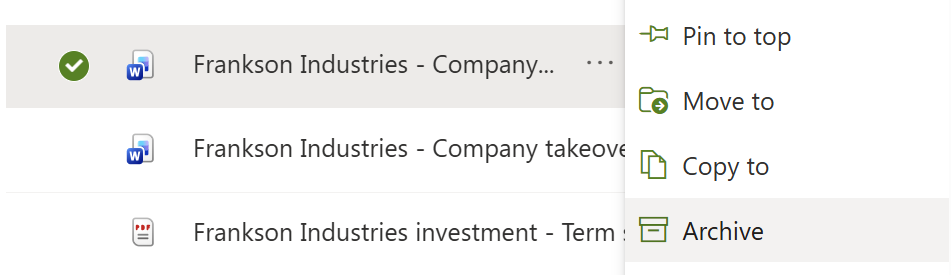
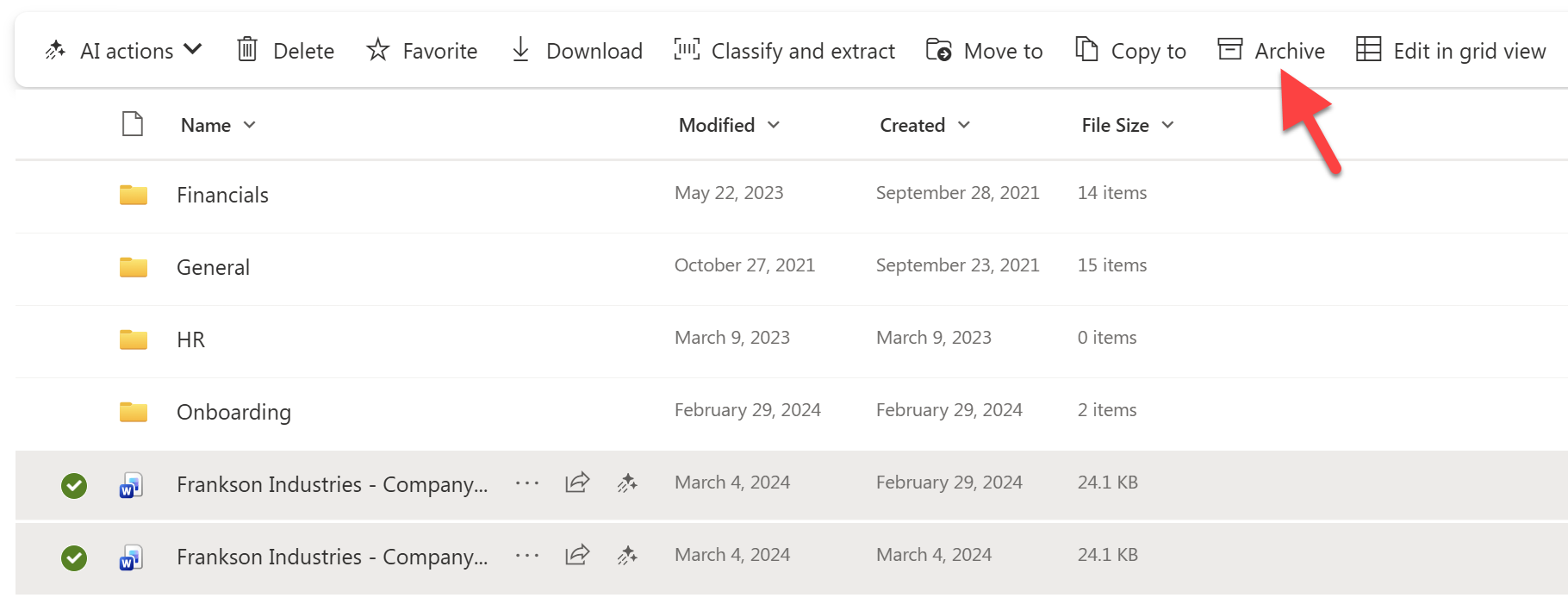
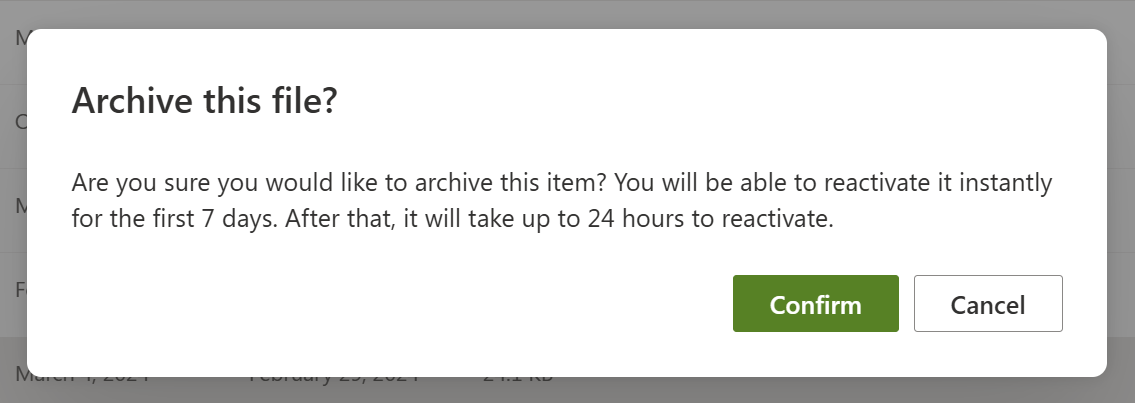
Archived files stay in place in the library, marked with an archive icon.
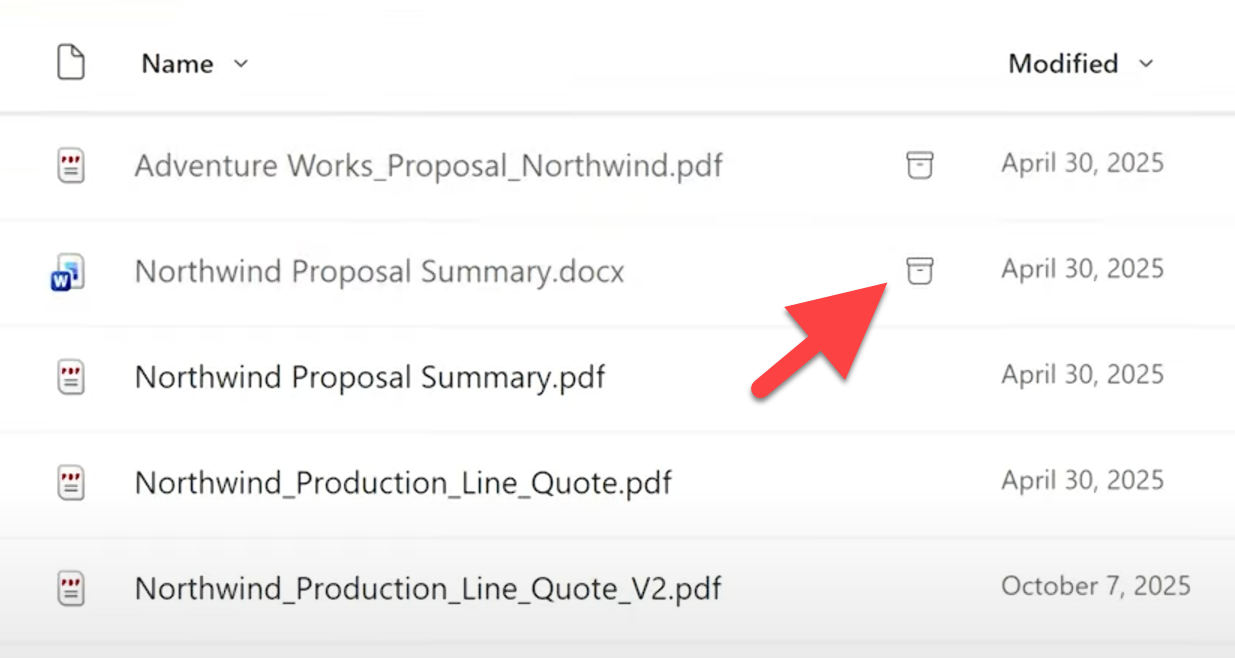
While a file is archived, people can still delete, rename, move, copy and view its properties, including editing metadata such as the content type or sensitivity label.

To bring a file back, choose Reactivate. Microsoft says files reactivate instantly and there's no reactivation fee.
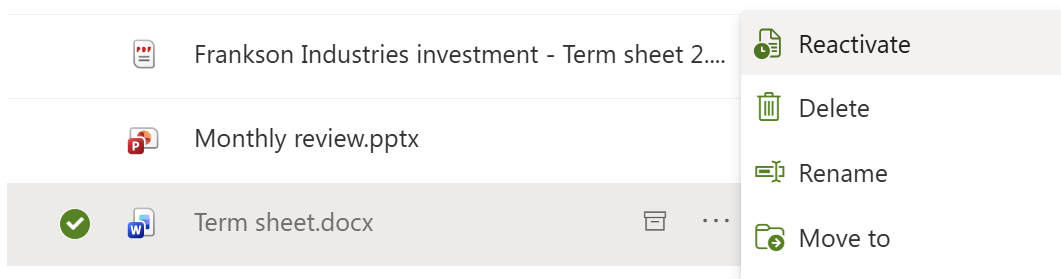
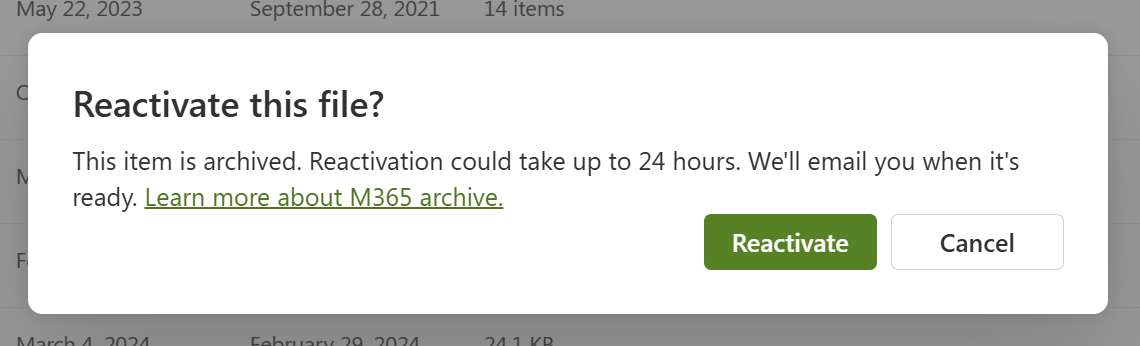
A reactivated file can't be archived again, by hand or by policy, for 120 days. That stops people moving files in and out of the archive tier to dodge storage costs.

Admins control the manual Archive command with PowerShell: Set-SPOTenant -AllowFileArchive $false turns it off for the whole tenant, and Set-SPOSite -AllowFileArchive $false turns it off for one site. Turning off the command doesn't stop policies archiving files. For the step-by-step process, see How to archive SharePoint files and folders.
How do you archive inactive SharePoint files automatically?
Use an inactive files policy in SharePoint Advanced Management. It archives files that nobody has opened for a period you set, across selected sites or all sites, and keeps running, so files are archived as they go stale. It's in public preview and configured with PowerShell only.
# Connect with SharePoint Online Management Shell 16.0.27709.12000 or later
Connect-SPOService -Url "https://contoso-admin.sharepoint.com"

# 1. Create a policy in simulation mode: files not opened for 24 months
New-SPOFileArchivePolicy -Name "InactiveFilesPilot" -PolicyType "SelectedSites" -LastAccessDateCriteria 24 -IsWhatIfMode $true

# 2. Add the pilot sites, then switch the policy on
Add-SPOSiteToFileArchivePolicy -PolicyId $policyId -Site "https://contoso.sharepoint.com/sites/projects"
Set-SPOFileArchivePolicy -PolicyId $policyId -State "Active"

# 3. Review what it would archive
Get-SPOFileArchivePolicyReport -PolicyId $policyId

# Stop the policy (archived files stay archived)
Set-SPOFileArchivePolicy -PolicyId $policyId -State "Inactive"- What it needs: a SharePoint Advanced Management entitlement, the SharePoint Administrator or Global Administrator role, the latest SharePoint Online Management Shell, and Microsoft 365 Archive with its billing set up. Microsoft's SharePoint Advanced Management licensing table doesn't yet list the policy, so check whether the entitlement that comes with a Copilot licence covers it in your tenant.
- Threshold: 6 to 48 months since a person last opened the file (24 by default). Access by apps, scripts and AI agents doesn't count.
- Scope:
SelectedSites(up to 1,000 sites per policy) orAllSiteswith exclusions. You can include or exclude file types. - Simulation: a policy can run in What-If mode and report what it would archive. Microsoft warns that enforcement may not archive exactly what the simulation reported.
- Scale: an
AllSitesrun scans up to 100,000 sites (Microsoft plans 1,000,000 by general availability), and archives 1 to 2 million files a day at current scale. Larger tenants are covered over later runs. - Status: public preview, PowerShell only. Microsoft plans SharePoint Admin Agent support before general availability, which is targeted for the end of 2026.
What admins miss about the inactive files policy
- Last access data before July 2025 is unreliable. Human access before then may not have been recorded, so old files can look inactive longer than they were. For critical content, Microsoft suggests a threshold that falls entirely after July 2025.
- Last access dates can lag by up to 30 days, so a file opened recently can still qualify.
- The site's storage figure doesn't drop. Archiving changes the tenant's storage accounting, not the storage shown for the site.
- Stopping or deleting a policy doesn't reactivate files. They stay archived until someone reactivates them.
- No OneDrive in the preview. The policy covers SharePoint sites only.
- It doesn't replace retention. Files under a retention policy stay in its scope after archiving.
- Some file types are never archived, including OneNote files, pages (.aspx), .json, .css and .js.
Microsoft's reference: Inactive files policy with SharePoint Advanced Management.
Site-level or file-level archiving: which should you use?
Use site-level archiving for sites nobody works in any more, and file-level archiving for inactive files inside sites that are still in use. Most tenants need far more of the second: sites rarely go completely quiet, but most of them collect files nobody opens.
| Site-level archiving | File-level archiving | |
|---|---|---|
| Scope | The whole site: libraries, lists, permissions and metadata | Individual files in an active site |
| What users see | The site is unavailable until reactivated | Files stay in place with an archive icon |
| Who can do it | SharePoint admins | Anyone with edit permission, or a policy |
| Automation | Inactive sites policy (SharePoint Advanced Management) | Inactive files policy (preview) |
| Not supported | Publishing sites, channel sites, some legacy templates | OneNote, pages, the Site Assets library |
| Best for | Finished projects, sites kept only for compliance | Mixed sites with years of old files |
Both use the same Microsoft 365 Archive tier, keep compliance controls in place and reactivate without a fee.
What does archiving cost, and does it free up storage?
Archived files stop counting toward your active SharePoint quota and count as archive storage instead. Archive storage costs $0.05 per GB a month, and you're charged only when active plus archived storage goes over your tenant's quota. If you're under quota, archiving costs nothing.
Compared with buying Extra File Storage at about $0.20 per GB a month, archiving cuts the cost of that content by about 75%. See File-level archiving in SharePoint: how much could I save? for a calculator, and SharePoint storage pricing for current list prices.
Two things surprise admins. The storage figure shown for a site doesn't drop when its files are archived, because archiving changes the tenant's accounting. And Microsoft removed the SharePoint reactivation fee on 31 March 2025, so reactivating is now free; the 120-day lock after reactivation is the only catch.
What can't you do with an archived file?
An archived file can't be opened until it's reactivated. That rules out:
- Opening, previewing or downloading it
- Viewing its version history
- Sharing it or copying a link
- Managing access
- Copilot and other AI actions
- Power Automate actions
Microsoft also lists known issues with archived files in some clients, including the mobile apps, older OneDrive sync clients and Office desktop apps not updated since 1 March 2026. Search, eDiscovery and Purview content search still find archived files, and admins can export them.
Because reactivation is free and instant, archiving inactive files is a low-risk cleanup action. Deciding which files to archive is the harder part; see How to decide what to archive.
Archiving inactive files without PowerShell: SProbot
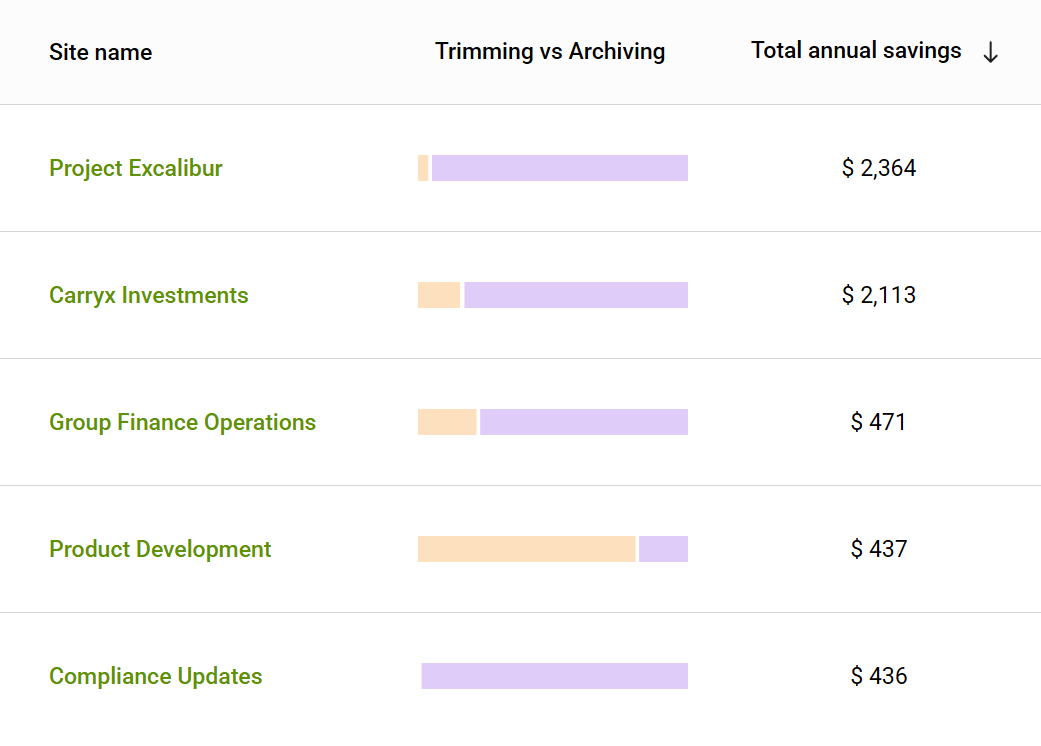
SProbot is for tenants without a SharePoint Advanced Management entitlement, and for admins who don't want to run and maintain PowerShell. You connect your tenant and SProbot crawls every site, finds the inactive files inside sites that are still in use, and calculates what each site would save, in dollars, by archiving them.
| Route | Licence | Hands-on work | Selects files by | Savings in money? |
|---|---|---|---|---|
| Archive by hand | Microsoft 365 Archive | Finding and selecting files, site by site | Whatever users choose | No |
| Inactive files policy (preview) | SharePoint Advanced Management plus Microsoft 365 Archive | PowerShell setup, simulation review, then automatic | Last access date, 6 to 48 months | No |
| SProbot | $235 per TB a year (free 14-day trial) plus Microsoft 365 Archive | About 15 minutes of your time | Not modified for 3 years | Yes, per site |
- Sites are ranked by savings, largest first, so you start where the money is.
- One bulk job archives every inactive file in a site while the site and its active files stay in use, and you can run it across as many sites as you need.
- It works with retention: archived files stay in their retention scope.
- Every action is recorded in the activity history.
Like the inactive files policy, SProbot archives at file level: it finds the inactive files hidden in active sites and archives just those, without taking any site offline. What SProbot saves is your time, not elapsed time: the crawl and the archive jobs still take days to weeks, but your part is about 15 minutes. It also prices version trimming on the same report, which is usually the bigger saving.
What would archiving save in your tenant?
Connect your tenant and SProbot emails you a savings report based on your own data, and you can run bulk cleanup on 5 sites.
Prefer to see it first? Book a demo to see the reports and cleanup actions on an example tenant.
FAQs
Is Microsoft 365 Archive file-level archiving generally available?
Yes. Archiving individual files by hand is available on SharePoint sites once Microsoft 365 Archive is set up, and it's on by default. The inactive files policy that archives files automatically is still in public preview.
How can I archive inactive SharePoint files automatically?
Use the inactive files policy in SharePoint Advanced Management. Create it with New-SPOFileArchivePolicy, set a last access threshold of 6 to 48 months, run it in simulation first, then switch it to enforcement. It's in public preview and PowerShell only.
Can I archive inactive files in active SharePoint sites without PowerShell?
Yes. You can select and archive files by hand, library by library, or use SProbot, which finds the inactive files inside every site, shows what archiving them would save in dollars, and archives them in bulk across as many sites as you choose, without scripts.
Does the inactive files policy need a licence?
Yes. It needs a SharePoint Advanced Management entitlement and Microsoft 365 Archive with its billing set up. Microsoft's licensing table doesn't yet list the policy, so check whether a Copilot licence covers it in your tenant.
Who can archive SharePoint files?
Anyone with edit permission on the file, on sites where manual archiving is allowed. Admins can turn the Archive command off for the tenant or for a site with PowerShell.
How long does it take to reactivate an archived file, and does it cost anything?
Microsoft says archived files reactivate instantly, and there's no reactivation fee for SharePoint. A reactivated file can't be archived again for 120 days.
Does archiving files reduce SharePoint storage?
Archived files stop counting toward your active storage quota and are charged as archive storage at $0.05 per GB a month, only above quota. The storage figure shown for the site itself doesn't drop.
Can Copilot see archived files?
No. Copilot doesn't use archived content, which keeps old files out of its answers. Search and eDiscovery still find them.
Can OneDrive files be archived?
Not with the inactive files policy: the preview covers SharePoint sites only. Microsoft documents file-level archiving for SharePoint sites.
Does stopping an inactive files policy reactivate the files?
No. Stopping or deleting a policy only stops future archiving. Files it already archived stay archived until someone reactivates them.