

Answer in brief
Yes, you can bulk delete SharePoint version history, but you should never treat it as a routine storage cleanup task. Version history may contain important recovery points, business records or content needed by site owners. Before removing versions: run detailed reports, confirm ownership, review retention requirements, and understand that deleted versions may not be recoverable.
If your goal is storage reduction, bulk deletion should be the final step after understanding where version growth exists and why it occurred.
Many administrators who have already performed the necessary checks immediately make use of How to trim versions to increase available SharePoint storage.
What does bulk deletion of version history entail?
Bulk deletion refers to removing multiple historical file versions across a library, site or broader collection of content rather than deleting individual versions one file at a time.
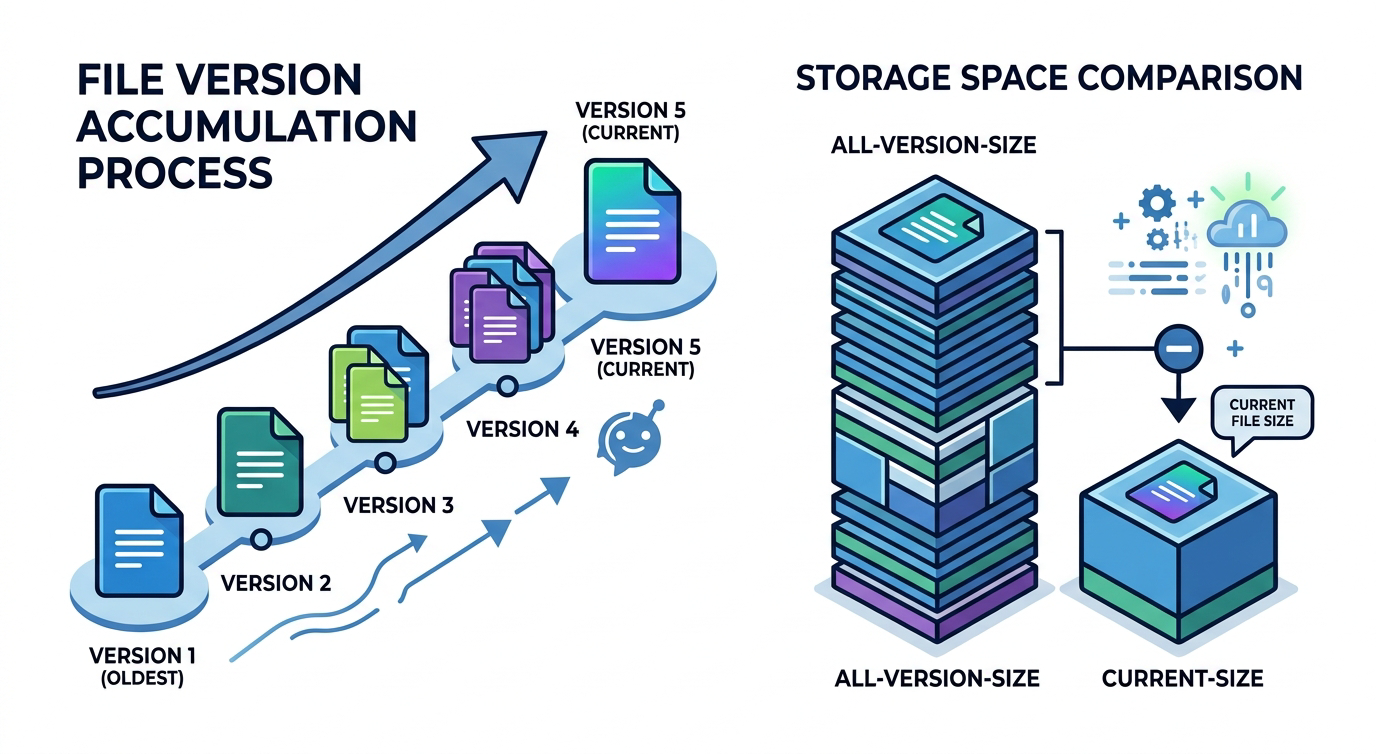
Version history exists to help users recover previous document states, investigate changes and maintain working continuity. Over time, however, heavily edited files can accumulate large numbers of versions and consume substantial storage.
Bulk deletion is usually considered when:
- Storage consumption is increasing rapidly or has already exceeded the tenant quota
- Version-heavy files dominate storage reports
- Legacy projects no longer require extensive recovery history
- Existing version policies are overly generous
What should you check before deleting versions?
Before any version-cleanup activity, you need enough evidence to understand both risk and impact. Storage savings alone are not a sufficient justification for deleting recovery history.
Important checks include:
- Report on version-heavy files
- Confirm content ownership
- Identify business-critical libraries
- Review retention requirements
- Validate recovery expectations
- Assess storage impact before action
Deleting versions without owner involvement can create avoidable risk, particularly where libraries support operational, financial, engineering or compliance-related processes.
For broader review preparation, use a structured process as described in SharePoint cleanup checklist for IT admins.
How do retention and compliance requirements affect version deletion?
Retention requirements may influence what can be modified, deleted or removed within a SharePoint environment. Technical cleanup activity should always be reviewed in the context of organisational governance requirements.
This article does not provide legal or compliance advice. Instead, the practical recommendation is simple: confirm applicable requirements before taking action.
Where uncertainty exists:
- Involve compliance stakeholders
- Involve site owners
- Document proposed changes
- Keep evidence of review decisions
- Avoid assumptions about recoverability
A storage problem should never be solved by creating a governance problem.
What approaches are available?
Several approaches may be used to reduce version history, each carrying different operational considerations.
Native controls
Microsoft provides version-management capabilities that can help reduce future version growth and limit ongoing storage consumption.
These controls are generally most effective when combined with a review process and clear ownership model.
Scripted approaches
Some organisations use scripted processes to change version settings or remove versions at scale.
While scripting may improve speed, it does not eliminate risk. Poor targeting, weak validation and missing ownership reviews can still result in unwanted outcomes.
Policy optimisation
In many environments, future version growth is a larger issue than existing version volume. Reviewing version limits may reduce long-term storage growth without immediately removing large quantities of historical content.
🔗 How to save SharePoint storage with automated version management
Is bulk deletion reversible?
One of the most important misconceptions about version cleanup is the assumption that deleted versions can always be restored.
Most bulk deletion scripts or 3rd-party solutions permanently delete versions because they are designed and optimised for storage cleanup first and foremost. This is why you should never assume deleted version history is recoverable.
Why reporting should come before action
The safest version-cleanup projects begin with reporting rather than deletion. Reporting helps answer questions such as:
- Which files have the largest number of versions?
- Which sites generate most version growth?
- Which libraries consume disproportionate storage?
- Which content is inactive or no longer actively edited?
- Which opportunities offer meaningful storage recovery?

Storage evidence also improves stakeholder confidence because decisions are based on measurable data rather than assumptions.
If you're approaching storage limits you should also review SharePoint storage limit exceeded? 6 Proven ways to reclaim space.
Conclusion
You can bulk delete SharePoint version history safely only when the activity is guided by ownership, reporting and governance awareness. Bulk deletion should never be treated as a simple storage-reduction shortcut.
The safest approach is to identify version-heavy content, validate business requirements, review retention considerations and understand the limitations of recovery before taking action. For many organisations, the most effective outcome comes from combining better visibility with better version-management policies rather than focusing only on deletion.
FAQ
Can SharePoint version history consume significant storage?
Yes. Frequently edited files can accumulate many versions over time, increasing overall storage consumption.
Is deleting version history always safe?
No. Safety depends on ownership, business value, retention requirements and recovery expectations.
Should I delete versions or reduce version limits?
The answer depends on the content and use case. Many organisations review limits first and then evaluate whether version removal is necessary.
Can I recover deleted versions later?
You should not assume deleted versions can be recovered. Understand recovery limitations before making changes.
What should I do before removing versions?
Generate reports, identify version-heavy files, confirm ownership, review compliance requirements and pilot changes before broader rollout.